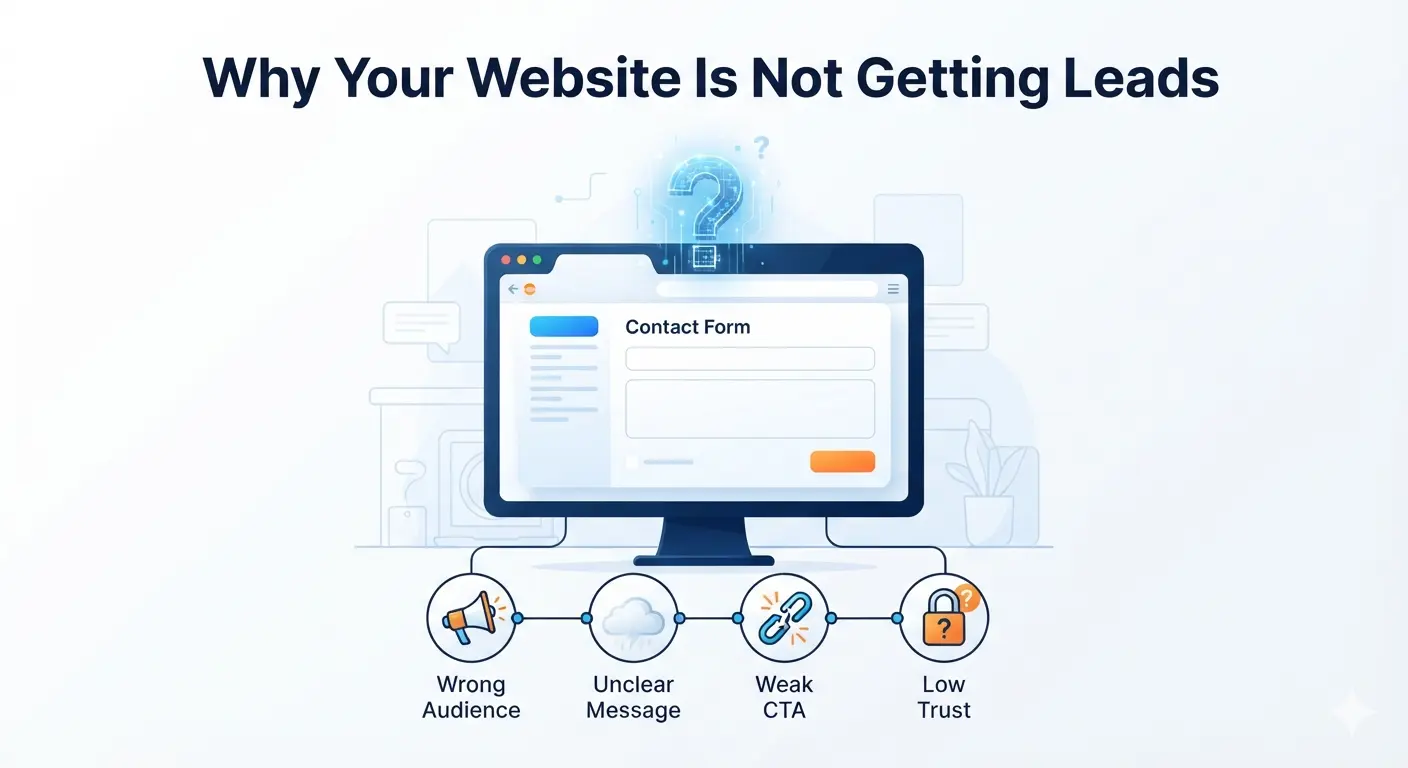
Your website is live. It looks decent. You shared it on social media. Maybe you even get some traffic.
But the contact form is quiet.
No calls. No bookings. No quote requests. No real business growth.
This is one of the most common problems small businesses face online: the website exists, but it does not generate leads.
The good news is that this is fixable. Most lead generation problems come from a small set of issues: unclear messaging, weak offers, poor SEO intent, missing trust signals, confusing navigation, slow pages, weak calls-to-action, bad forms, or no tracking.
This guide breaks down why your website is not getting leads and what to fix first.
Quick answer: why your website is not getting leads
Your website is probably not getting leads because visitors do not clearly understand:
- What you do
- Who you help
- Why they should trust you
- What makes you different
- What action they should take next
Or the wrong people are visiting your site.
Traffic alone does not create leads. You need the right traffic, the right message, the right offer, and a simple path to contact you.
The lead generation formula
Website leads come from four things working together:
Right audience + clear message + strong trust + easy action = more leads
If one part is weak, leads drop.
1. Your website message is unclear
The first job of your website is not to look beautiful.
The first job is to make visitors understand your value quickly.
When someone lands on your homepage, they should know within a few seconds:
- What service you provide
- Who it is for
- What problem you solve
- Why they should choose you
- What to do next
If visitors have to think too hard, they leave.
Signs your message is unclear
- Your headline says something generic like “We help businesses grow”
- Your homepage talks about you before explaining the customer problem
- Your services are described with vague words instead of clear outcomes
- Visitors cannot tell whether you serve them specifically
- Your CTA is hidden or unclear
Bad homepage message
“We deliver innovative digital solutions for modern businesses.”
This sounds polished, but it does not explain much.
Better homepage message
“Professional websites for local businesses that need more calls, bookings, and quote requests.”
This is clearer because it says:
- What you build
- Who it is for
- What result matters
How to fix it
Rewrite your homepage hero section around the customer.
Use this formula:
We help [type of customer] get [specific result] with [service/product].
Examples:
- We help clinics get more patient appointments with fast, mobile-friendly websites.
- We help schools manage admissions, notices, and results with custom digital systems.
- We help local service businesses get more calls from Google with SEO-focused websites.
Clear always beats clever.
2. You are attracting the wrong traffic
Some websites get visitors but no leads because the traffic is not commercial.
A visitor reading a general blog post may not be ready to buy. A visitor searching “web design agency near me” or “how much does a small business website cost” is much closer to taking action.
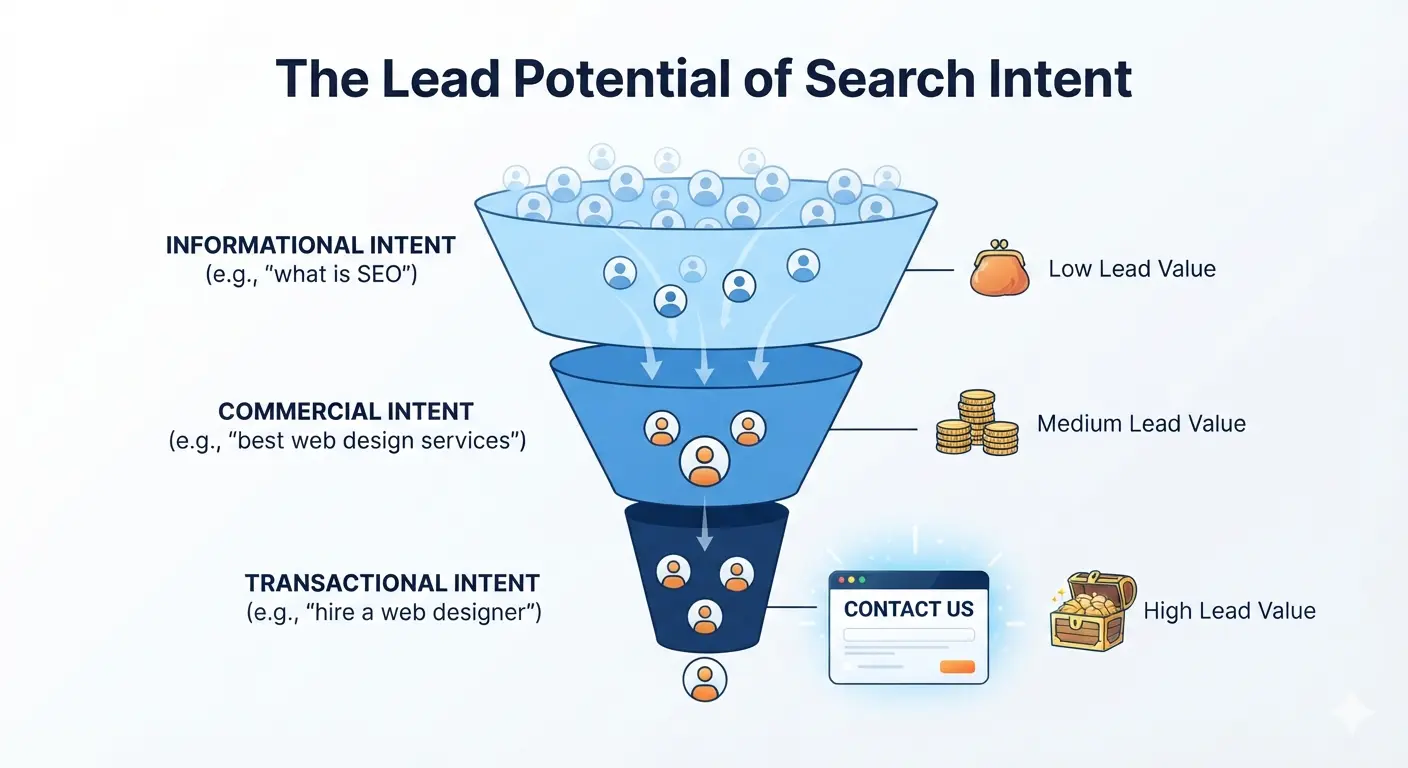
This is why search intent matters.
Traffic types
| Traffic type | Example keyword | Lead potential |
|---|---|---|
| Informational | what is web design | Low to medium |
| Comparison | WordPress vs custom website | Medium |
| Commercial | best web design agency for small business | High |
| Transactional | hire website designer | Very high |
| Local | web design company in Dhaka | Very high |
If your content only targets informational topics, you may get readers but not clients.
How to fix it
Create pages and blog posts for buying-intent keywords:
- Small business website cost
- Website design package
- Web design agency for small business
- Local SEO services
- Ecommerce website development
- Website redesign service
- Website maintenance service
Then link those posts to your service pages and contact page.
Start with this related guide: How Much Does a Small Business Website Cost in 2026?
3. Your call-to-action is weak or missing
A website without a clear CTA is like a shop with no checkout counter.
Visitors may like what they see, but they do not know what to do next.
Common CTA problems
- CTA button only appears once
- Button text is vague
- CTA blends into the design
- Contact page is hard to find
- No CTA after service descriptions
- No CTA inside blog posts
- Mobile CTA is hidden or hard to tap
Weak CTA examples
- Submit
- Learn more
- Click here
- Send
Strong CTA examples
- Get a free website audit
- Request a project quote
- Book a free consultation
- Start your website project
- Get your SEO review
Strong CTAs tell the visitor what they get.
How to fix it
Add one primary CTA across your website.
For a service business, use:
Get a Free Consultation
For a website design agency, use:
Request a Website Quote
For a local SEO service, use:
Get a Free SEO Audit
Place the CTA:
- In the header
- In the hero section
- After each service section
- In the middle of long pages
- At the end of every blog post
- On mobile where users can easily tap it
Your CTA should feel like the natural next step.
4. Your offer is not specific enough
Sometimes the problem is not the website design. It is the offer.
“Contact us” is not always enough.
People hesitate because they are unsure what happens next. Will you call them? Will they be pressured? Will it cost money? Will they get useful advice?
Weak offer
“Contact us for more information.”
Better offer
“Get a free 15-minute website review. We will show you what is hurting your leads and what to fix first.”
The second offer is specific, low-risk, and useful.
Lead generation offers that work
Try one of these:
- Free website audit
- Free SEO audit
- Free homepage review
- Free website cost estimate
- Free consultation call
- Free landing page review
- Downloadable website checklist
- Quote request with response in 24 hours
How to fix it
Make your offer concrete.
Answer:
- What does the visitor get?
- How long does it take?
- Is it free?
- What happens after they submit?
- Why is it worth their time?
Example:
Request a free website audit. We will review your homepage, speed, SEO basics, and lead generation setup, then send practical recommendations within 24 hours.
This removes uncertainty and increases action.
5. Your website does not build enough trust
Visitors do not become leads just because they need your service.
They become leads when they believe you can help them.
Trust is especially important for small businesses, agencies, clinics, schools, ecommerce stores, and professional service providers.
Missing trust signals
Your website may be missing:
- Testimonials
- Client logos
- Portfolio examples
- Case studies
- Before/after results
- Google reviews
- Real team photos
- Clear contact details
- Business address or service area
- Professional email address
- Security badges for ecommerce
- Clear refund, warranty, or support policy
How to fix it
Add trust near every decision point.
On your homepage:
- Add 2-3 testimonials
- Show project examples
- Mention years of experience or project count
- Add a simple “How it works” section
On service pages:
- Show relevant work samples
- Add FAQs
- Explain deliverables
- Show process and timeline
On contact pages:
- Tell people when you will reply
- Show phone, email, and location if relevant
- Add a short trust statement
Trust should not live only on one page. It should appear wherever a visitor is deciding whether to contact you.
6. Your service pages are too thin
Many small business websites have one short services page with a few boxes:
- Web design
- SEO
- Branding
- Digital marketing
That is not enough for SEO or conversions.
Each important service should have its own detailed page.
Why thin service pages hurt leads
Thin pages fail because they do not:
- Explain the service deeply
- Answer buyer questions
- Target specific keywords
- Show examples
- Handle objections
- Build enough confidence
What a strong service page includes
Each service page should include:
- Clear headline
- Who the service is for
- Problems it solves
- What is included
- Process
- Timeline
- Pricing guidance or starting range
- Results or benefits
- Portfolio examples
- Testimonials
- FAQ
- Strong CTA
How to fix it
Create individual pages for your highest-value services.
Examples:
- Website Design for Small Businesses
- SEO Services for Local Businesses
- Ecommerce Website Development
- WordPress Website Maintenance
- Custom Web Application Development
- School Management Software
- Clinic Management Software
Then link blog posts to the most relevant service page.
For deeper planning, read: How to Choose the Right Website Design Package for Your Brand
7. Your website is too slow
Speed affects both SEO and conversion.
A slow website creates frustration before the visitor even reads your offer.
Why speed matters for leads
Slow pages can cause:
- Higher bounce rate
- Lower trust
- Lower Google rankings
- Fewer form submissions
- Poor mobile experience
Most small business visitors are impatient. If the page feels slow, they may return to Google and click a competitor.
Common speed problems
- Huge uncompressed images
- Too many plugins
- Cheap overloaded hosting
- Heavy themes
- Too much JavaScript
- No caching
- No CDN
- Poor mobile optimization
How to fix it
Start with the basics:
- Compress images
- Use modern image formats
- Remove unnecessary plugins
- Enable caching
- Choose reliable hosting
- Use a CDN if serving multiple locations
- Test mobile speed, not only desktop speed
If your site is on WordPress, this guide can help: Top WordPress Plugins & Tools for Faster, More Secure Websites
8. Your contact form has too much friction
A form should make contacting you easy.
Many websites accidentally make forms feel like work.
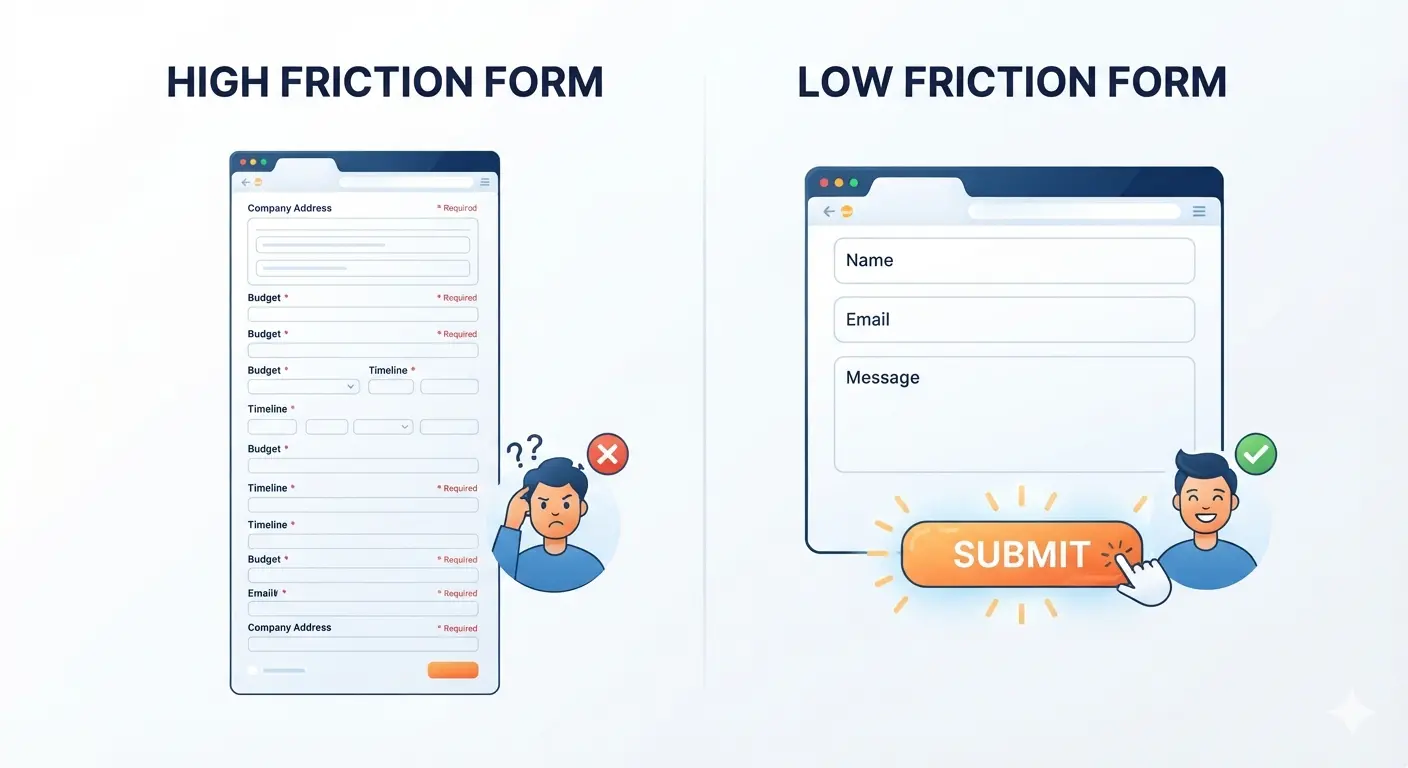
Form mistakes that reduce leads
- Too many fields
- Required phone number too early
- No clear submit button
- No confirmation message
- Form does not work on mobile
- Captcha is too aggressive
- No privacy reassurance
- No explanation of what happens next
Bad form
- Full name
- Phone
- Company
- Website
- Budget
- Timeline
- Service type
- Project details
- Address
- How did you hear about us?
This may be useful for you, but it is heavy for the visitor.
Better form
- Name
- Service needed
- Message
You can ask deeper questions after the lead starts the conversation.
How to fix it
Keep your form short.
Then add a small line under the button:
We usually reply within 24 hours. No spam, no pressure.
Also test the form yourself every month. A broken form can silently kill leads.
9. Your mobile experience is weak
For many small businesses, most visitors come from mobile.
If your website is hard to use on a phone, you will lose leads.
Mobile lead problems
- Text is too small
- Buttons are hard to tap
- Contact form is too long
- Page loads slowly
- Navigation is confusing
- Phone number is not clickable
- Important sections are buried
- Popups cover the screen
How to fix it
Open your website on your phone and ask:
- Can I understand the offer in 5 seconds?
- Can I tap the CTA easily?
- Can I call with one tap?
- Can I submit the form without zooming?
- Does the page load quickly?
- Is the contact page easy to find?
For local businesses, add a click-to-call button in the header or hero section.
Mobile visitors often want speed. Do not make them hunt.
10. You are not tracking leads properly
Some websites are getting leads, but the business owner cannot see where they come from.
Others are getting traffic, but no one knows which pages are working.
Without tracking, you are guessing.
What you should track
At minimum, track:
- Form submissions
- Phone clicks
- WhatsApp clicks if used
- Booking clicks
- Email clicks
- Quote button clicks
- Top landing pages
- Search queries
- Traffic sources
In Google Analytics 4, important actions can be marked as key events. This helps you see which channels and pages generate meaningful results, not just visits.
Google Search Console helps you see which queries bring impressions and clicks from Google Search.
How to fix it
Set up:
- Google Analytics 4
- Google Search Console
- Form submission tracking
- Click tracking for phone/email/WhatsApp
- Thank-you page or confirmation event
Then review performance monthly.
Ask:
- Which pages bring traffic?
- Which pages bring leads?
- Which keywords get impressions but low clicks?
- Which service pages need improvement?
- Which blog posts should link to service pages?
You cannot improve what you do not measure.
11. Your SEO brings visitors, but not buyers
SEO is powerful, but not all SEO traffic has the same value.
A blog post like “what is a website” may bring beginners. A post like “how much does a small business website cost” brings buyers who are closer to making a decision.
Signs your SEO traffic is low-intent
- Blog traffic is growing but contact forms are flat
- Visitors read one post and leave
- Search queries are too general
- Service pages get very little traffic
- Blog posts do not link to contact or service pages
- You rank for topics that do not match your services
How to fix it
Build content around the buyer journey.
Create content for:
- Problem-aware visitors: “why your website is not getting leads”
- Solution-aware visitors: “how to get more website leads”
- Comparison visitors: “DIY website vs agency”
- Price-aware visitors: “small business website cost”
- Ready-to-buy visitors: “web design agency for small business”
Then connect those posts with internal links.
Helpful traffic is traffic that can become a customer.
12. Your website does not answer objections
Visitors often leave because they still have unanswered questions.
They may wonder:
- How much does it cost?
- How long will it take?
- Can I trust this business?
- Have they worked with businesses like mine?
- What happens after I contact them?
- Do they provide support?
- Can I update the site myself?
- Will this help me rank on Google?
If your website does not answer these questions, visitors may not contact you.
How to fix it
Add FAQ sections to:
- Homepage
- Service pages
- Pricing or package pages
- Contact page
- Blog posts
Good FAQs reduce doubt.
Example FAQs for a web design service:
- How much does a small business website cost?
- How long does a website project take?
- Do you write the website content?
- Will my website be SEO-friendly?
- Can I update the website myself?
- Do you provide maintenance after launch?
Read the full pricing guide here: How Much Does a Small Business Website Cost in 2026?
13. Your design looks good but does not guide action
A beautiful website can still fail.
Design should guide attention, not just decorate the page.
Design problems that hurt leads
- No clear visual hierarchy
- CTA buttons look like normal links
- Too many competing sections
- Important information is below too much filler
- Text is hard to scan
- Service details are hidden
- Page looks nice but does not persuade
How to fix it
Use design to guide the visitor:
- Strong headline
- Clear subheading
- One primary CTA
- Simple navigation
- Benefit-focused service sections
- Trust signals near CTAs
- Short paragraphs
- Scannable headings
- Strong final CTA
Good design makes the next step obvious.
14. You do not follow up fast enough
Lead generation does not stop when someone submits a form.
If you reply too late, the lead may already be talking to a competitor.
Follow-up mistakes
- Waiting 2-3 days to reply
- Sending generic responses
- No confirmation email
- No clear next step
- No booking link
- No CRM or lead tracking
How to fix it
Create a simple follow-up system:
- Show a confirmation message after form submission
- Send an automatic email
- Reply personally within 24 hours
- Offer a clear next step
- Track lead status in a spreadsheet or CRM
Speed matters. A fast, helpful reply can win the project before competitors respond.
Website lead generation audit checklist
Use this checklist to find what is blocking leads.
Messaging
- Homepage explains what you do in 5 seconds
- Headline names the customer or problem
- Services are described clearly
- Benefits are stronger than buzzwords
- Offer is specific and low-risk
Trust
- Testimonials are visible
- Portfolio or examples are included
- Contact details are easy to find
- About page builds credibility
- FAQs answer common objections
Conversion
- CTA appears above the fold
- CTA appears on every important page
- Contact form is short
- Phone/email buttons work
- Mobile CTA is easy to tap
SEO and traffic
- Service pages target buying-intent keywords
- Blog posts link to service pages
- Local SEO basics are in place
- Google Search Console is connected
- Search queries match your services
Technical
- Website loads fast
- Images are compressed
- Forms are tested
- Site works on mobile
- Analytics tracks key events
What to fix first
If you feel overwhelmed, start here.
Day 1: Fix the homepage message
Rewrite your hero section:
- Clear headline
- Benefit-focused subheading
- Strong CTA
- Trust signal
Day 2: Improve your CTA
Replace vague CTAs with a specific offer:
- Get a free website audit
- Request a project quote
- Book a free consultation
Day 3: Shorten your contact form
Keep only the fields you truly need.
Day 4: Add trust signals
Add testimonials, portfolio items, client results, or real photos.
Day 5: Set up tracking
Track form submissions, phone clicks, and important button clicks.
Week 2: Strengthen service pages
Create or improve pages for your main services.
Week 3: Build buying-intent content
Write posts that answer questions buyers ask before hiring.
Example: before and after lead generation fix
Before
Homepage headline:
“Creative Digital Solutions for Your Business”
CTA:
“Learn More”
Form:
10 required fields
Trust:
No testimonials or portfolio on homepage
Tracking:
Only page views
After
Homepage headline:
“Websites for Small Businesses That Need More Leads”
CTA:
“Get a Free Website Audit”
Form:
Name, email, service, message
Trust:
3 testimonials, 4 project examples, clear process
Tracking:
Form submissions, phone clicks, CTA clicks, Search Console queries
This version is clearer, easier to trust, and easier to act on.
Frequently asked questions
Why is my website getting traffic but no leads?
Your traffic may be low-intent, your message may be unclear, your offer may be weak, or your conversion path may be difficult. Review your top landing pages, search queries, CTAs, service pages, and contact form.
How many visitors do I need to get leads?
It depends on conversion rate and offer quality.
If your website converts at 2%, 500 visitors may produce 10 leads. If it converts at 0.2%, the same traffic produces only 1 lead.
Improve conversion before spending heavily on more traffic.
What is a good website conversion rate?
For lead generation websites, 2%-5% is common, and strong service pages can perform higher. The best benchmark is your own current rate. Measure it, improve it, and compare month by month.
Should I redesign my website if it is not getting leads?
Maybe, but do not redesign blindly.
First audit the message, offer, traffic, CTAs, trust signals, forms, and analytics. Sometimes a few focused improvements can increase leads without a full rebuild.
If the site is outdated, slow, hard to edit, or poorly structured for SEO, a redesign may be the smarter long-term move.
How can I get more leads from my website quickly?
Start with quick wins:
- Rewrite your headline
- Add a stronger CTA
- Shorten your contact form
- Add testimonials
- Make phone/email clickable
- Add a free audit offer
- Track form submissions
These changes can often be done faster than building new traffic.
Does SEO help generate leads?
Yes, but only when SEO targets the right intent.
Ranking for broad informational keywords may bring readers. Ranking for service, pricing, comparison, and local keywords can bring buyers.
What should every lead generation website include?
Every lead generation website should include:
- Clear homepage message
- Service pages
- Strong CTA
- Trust signals
- Contact form
- Click-to-call on mobile
- FAQs
- Analytics tracking
- Fast mobile performance
- Internal links from blog posts to services
Final thoughts
If your website is not getting leads, do not assume the answer is simply “more traffic.”
More traffic helps only when the website is ready to convert.
Start with the basics:
- Make your message clear
- Target the right visitors
- Offer a specific next step
- Build trust
- Remove friction
- Track what matters
- Improve your service pages
A lead-generating website is not just an online brochure. It is a guided path from problem to trust to action.
Need help finding why your website is not getting leads? Contact TheWebPal for a free website audit, conversion review, or redesign recommendation tailored to your business.
Related resources
- How Much Does a Small Business Website Cost in 2026?
- Website Conversion Best Practices: Turn Visitors into Customers
- How to Choose the Right Website Design Package for Your Brand
- SEO for Local Businesses: Simple Steps to Rank and Get More Leads
- The Ultimate Guide to Web Hosting, Website Design & Online Growth for Small Businesses