Your business website should do more than look professional.
It should explain what you offer, build trust, help people find you on Google, and turn visitors into leads or customers.
Many small business websites fail because they miss the basics. They may have a nice homepage, but no clear call-to-action. They may list services, but not explain who those services are for. They may have a contact form, but no trust signals, no SEO structure, and no tracking.
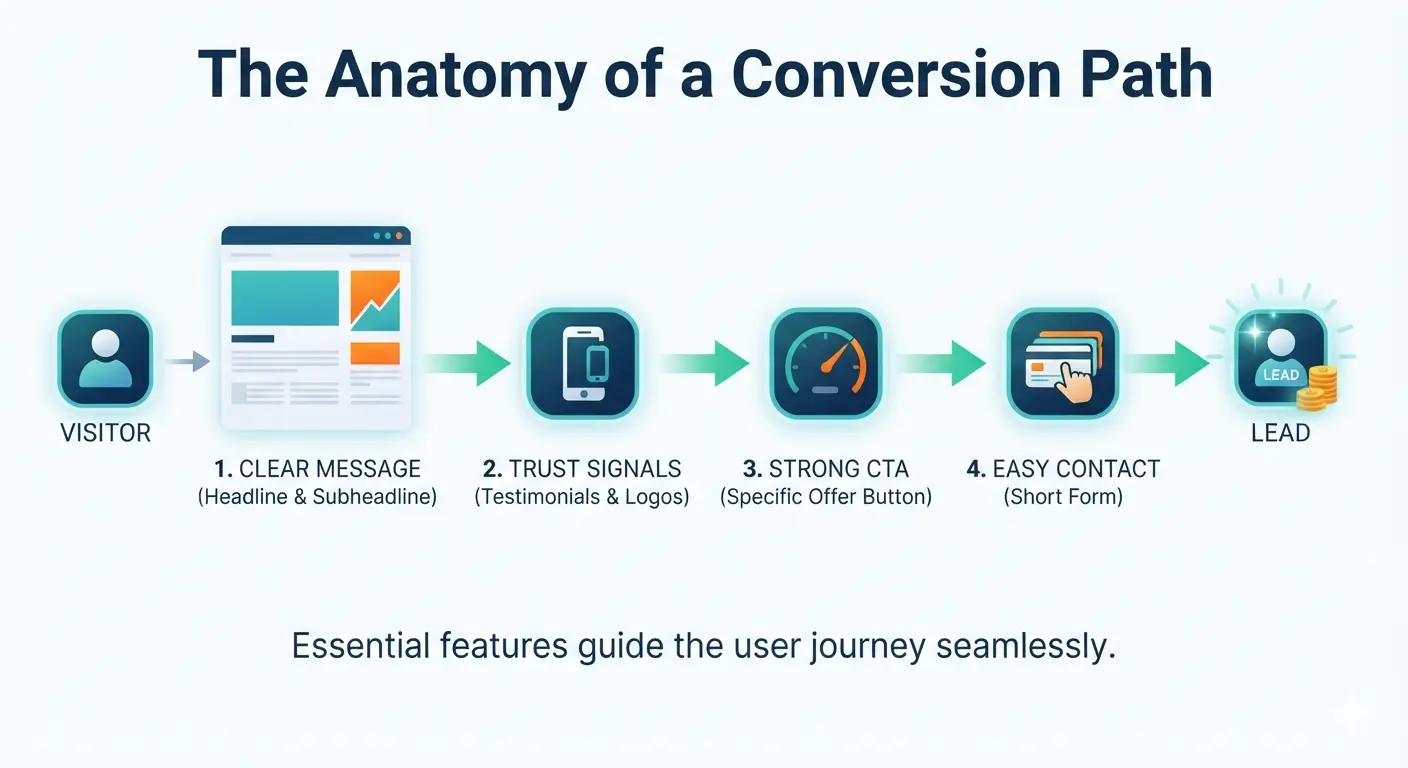
A good website is not just a collection of pages. It is a system that guides visitors from first impression to action.
This guide covers the 10 features every business website needs, why each one matters, and how to implement them properly.
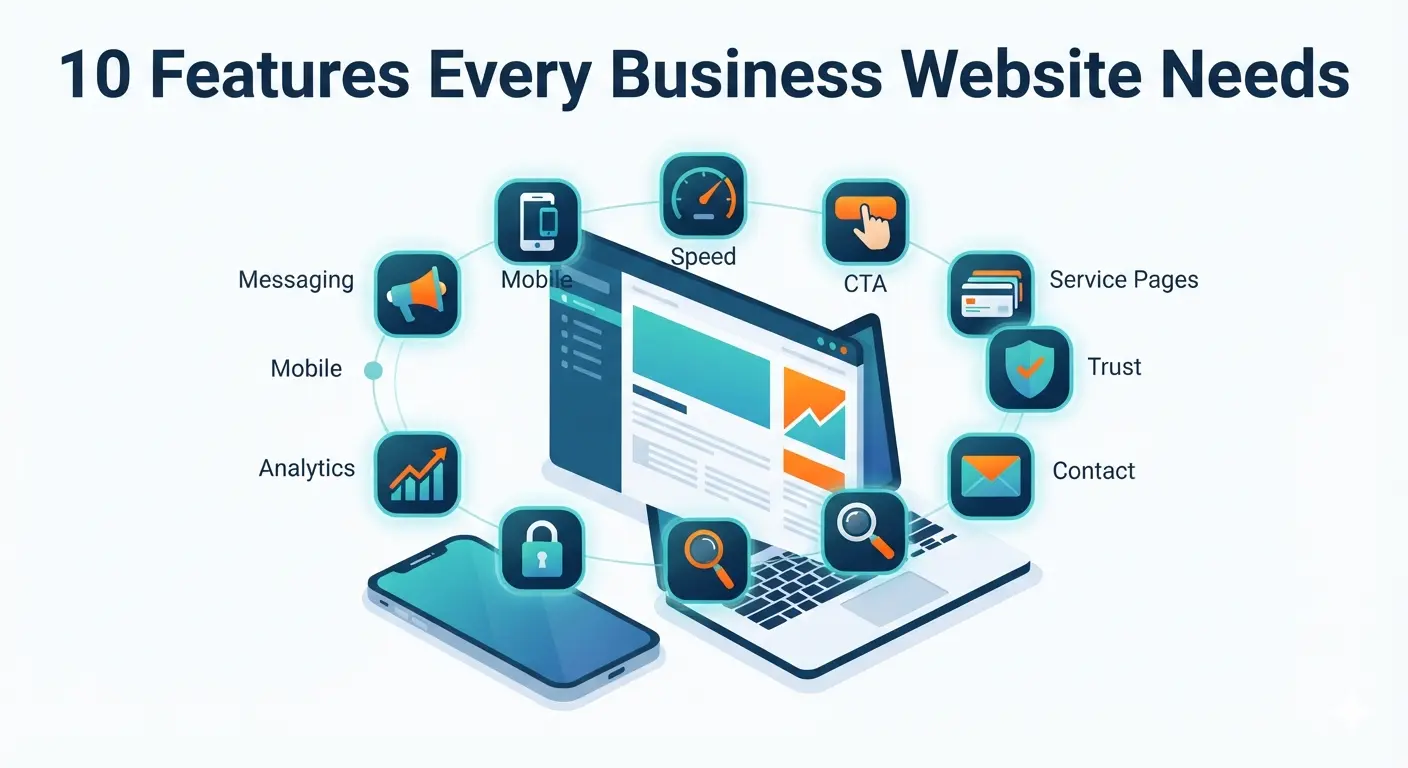
Quick checklist: essential business website features
Every business website should include:
- Clear homepage message
- Mobile-friendly responsive design
- Fast page speed
- Strong call-to-action
- Service or product pages
- Trust signals and social proof
- Easy contact options
- SEO-friendly structure
- Security and privacy basics
- Analytics and conversion tracking
If your website has all 10, you have a stronger foundation for traffic, trust, and lead generation.
1. Clear homepage message
Your homepage has one important job: help visitors understand your business quickly.
Within a few seconds, visitors should know:
- What you do
- Who you help
- What problem you solve
- Why they should trust you
- What action they should take next
If your homepage message is vague, people leave.
Weak homepage message
“We provide innovative solutions for modern businesses.”
This sounds professional, but it does not say what the business actually does.
Strong homepage message
“Professional websites for small businesses that need more calls, bookings, and quote requests.”
This is clearer because it explains the service, audience, and result.
What your homepage hero should include
A strong hero section includes:
- Clear headline
- Short supporting sentence
- Primary CTA button
- Trust signal
- Relevant image or visual
Example:
Headline: Websites that help local businesses get more leads
Subheading: We design fast, SEO-friendly websites built to convert visitors into customers.
CTA: Get a free website audit
Trust: 50+ projects completed
How to improve yours
Use this formula:
We help [audience] get [result] with [service].
Examples:
- We help clinics get more appointments with fast healthcare websites.
- We help schools manage admissions and results with custom digital systems.
- We help service businesses rank on Google and convert more visitors.
Clear messaging is the foundation of every lead-generating website.
2. Mobile-friendly responsive design
Your website must work beautifully on mobile.
Many visitors will find your website from their phone through Google, social media, WhatsApp, maps, or referrals. If your site is hard to read or use on mobile, you lose leads before they contact you.
Mobile problems that hurt business
- Text is too small
- Buttons are hard to tap
- Contact form is too long
- Images overflow the screen
- Navigation is confusing
- Phone number is not clickable
- Page loads slowly on mobile data
What mobile-friendly design means
A mobile-friendly website should have:
- Readable text without zooming
- Tap-friendly buttons
- Simple navigation
- Fast loading
- Short forms
- Click-to-call links
- Layouts that adapt to screen size
Mobile checklist
- Can users understand your offer in 5 seconds?
- Is the main CTA visible?
- Can users call with one tap?
- Is the contact form easy to complete?
- Are images properly sized?
- Does the page load quickly?
Mobile is not a smaller version of desktop. It is often the main experience.
3. Fast page speed
Speed affects user experience, SEO, and conversions.
People do not wait patiently for slow websites. If a page takes too long to load, visitors often return to Google and click a competitor.
Why speed matters
Fast websites usually get:
- Lower bounce rates
- Better user experience
- More form submissions
- Better mobile performance
- Stronger SEO foundation
Slow websites often feel less trustworthy, even when the business is good.
Common causes of slow websites
- Large uncompressed images
- Too many plugins
- Cheap hosting
- Heavy themes
- Unused JavaScript
- No caching
- No CDN
- Poor mobile optimization
How to improve speed
Start with:
- Compressing images
- Using modern image formats
- Removing unused plugins
- Enabling caching
- Choosing reliable hosting
- Testing mobile speed
- Avoiding unnecessary animations
If you use WordPress, read this related guide: Top WordPress Plugins & Tools for Faster, More Secure Websites
4. Strong call-to-action
A call-to-action, or CTA, tells visitors what to do next.
Without a strong CTA, your website becomes passive. People may read your content, like your work, and still leave without contacting you.
Weak CTAs
- Submit
- Click here
- Learn more
- Send
Strong CTAs
- Get a free website audit
- Request a project quote
- Book a free consultation
- Start your website project
- Get your SEO review
Strong CTAs are specific. They explain what the visitor gets.
Where to place CTAs
Add CTAs:
- In the header
- In the homepage hero
- After service sections
- On service pages
- Inside blog posts
- Before the footer
- On mobile navigation
CTA best practice
Use one primary CTA across the website.
If your goal is leads, choose something like:
Get a Free Consultation
If your goal is quote requests, choose:
Request a Website Quote
If your goal is audits, choose:
Get a Free Website Audit
The next step should be obvious.
5. Clear service or product pages
Your website should not rely only on the homepage to sell your business.
Every important service or product needs its own page.
Why service pages matter
Dedicated service pages help:
- Visitors understand what you offer
- Google understand what you should rank for
- You answer buyer questions
- You build trust around each service
- You link blog posts to relevant offers
Thin service page problem
Many businesses have one services page with short cards:
- Web design
- SEO
- Digital marketing
- Branding
That is not enough.
Each major service should explain who it is for, what is included, what problems it solves, and how the process works.
What a strong service page includes
Each service page should include:
- Clear service headline
- Who the service is for
- Problems it solves
- Benefits
- Deliverables
- Process
- Timeline
- Pricing guidance if possible
- FAQs
- Testimonials or examples
- CTA
Example service page structure
For a web design service:
- Headline: Small Business Website Design
- Problem: Your website looks outdated and does not generate leads
- Solution: Fast, mobile-friendly, SEO-ready website
- What is included: Pages, forms, SEO setup, analytics
- Process: Discovery, design, development, launch
- Proof: Portfolio or testimonials
- CTA: Request a website quote
Strong service pages convert better than generic service lists.
6. Trust signals and social proof
Visitors need a reason to trust you before they contact you.
Trust signals show that your business is real, capable, and safe to work with.
Important trust signals
Add:
- Testimonials
- Client logos
- Portfolio examples
- Case studies
- Google reviews
- Business address or service area
- Real team photos
- Project results
- Certifications if relevant
- Security badges for ecommerce
- Clear contact information
Where to place trust signals
Do not hide all trust on one testimonials page.
Place trust signals:
- Near the homepage CTA
- Below service descriptions
- On pricing or package sections
- Near contact forms
- On product pages
- Inside case studies
Good testimonial format
A strong testimonial should include:
- Client name
- Business name if possible
- Specific result or experience
- Photo or logo if available
Example:
TheWebPal redesigned our website and made it much easier for customers to contact us. We started receiving more quote requests within the first month.
Specific testimonials are more believable than generic praise.
7. Easy contact options
If people want to contact you, make it effortless.
Do not make visitors search for your phone number, email, address, or contact form.
Essential contact elements
Your website should include:
- Contact page
- Contact form
- Business email
- Phone number if relevant
- Click-to-call on mobile
- WhatsApp or Messenger link if used
- Business address or service area
- Response time expectation
Contact form best practices
Keep your form short:
- Name
- Service needed
- Message
You can ask for more information later.
Add reassurance
Near the form, add:
We usually reply within 24 hours. No spam, no pressure.
This reduces hesitation.
Test your contact options
Every month, test:
- Contact form submission
- Email delivery
- Phone links
- WhatsApp links
- Thank-you message
- Auto-reply if used
A broken contact form can silently cost you leads.
Read more: Why Your Website Is Not Getting Leads
8. SEO-friendly website structure
Your website should be easy for both visitors and search engines to understand.
SEO is not only about blog posts. Your site structure, URLs, headings, internal links, page titles, and content organization all matter.
SEO-friendly structure includes
- Clear navigation
- Descriptive URLs
- One main topic per page
- Proper heading structure
- Page titles and meta descriptions
- Internal links between related pages
- Image alt text
- Sitemap
- Fast loading
- Mobile-friendly design
Example URL structure
Good:
/services/web-design/services/local-seo/blog/small-business-website-cost
Weak:
/page1/services?id=23/new-page
Clear URLs help users and search engines understand the page.
Internal linking matters
Your blog posts should link to:
- Related blog posts
- Relevant service pages
- Contact page
- Main pillar guides
Example:
A post about website cost should link to web design services, design package guide, conversion guide, and contact page.
Related: SEO for Local Businesses: Simple Steps to Rank and Get More Leads
9. Security and privacy basics
Security is not optional.
Even a small business website needs basic protection. Visitors should feel safe submitting forms, browsing your pages, or buying products.
Security basics every site needs
- SSL certificate
- Secure hosting
- Regular backups
- Software updates
- Spam protection
- Strong admin passwords
- Limited admin access
- Malware scanning
- Secure forms
Privacy basics
Your website should include:
- Privacy policy
- Terms of service if needed
- Cookie notice if required for your region
- Clear explanation of how form data is used
- Secure handling of customer information
Why this matters
Security problems can damage:
- Customer trust
- SEO visibility
- Website uptime
- Brand reputation
- Sales and lead flow
If you run WordPress, ecommerce, booking, or customer portals, maintenance is especially important.
10. Analytics and conversion tracking
You cannot improve what you do not measure.
A business website should track more than page views. It should track actions that matter.
What to track
Track:
- Form submissions
- Phone clicks
- Email clicks
- WhatsApp clicks
- Quote button clicks
- Booking clicks
- Product purchases
- Top landing pages
- Search queries
- Traffic sources
Useful tools
Start with:
- Google Analytics 4
- Google Search Console
- Form tracking
- Heatmap tools if needed
- CRM or spreadsheet for leads
What to review monthly
Ask:
- Which pages get the most traffic?
- Which pages generate leads?
- Which keywords bring visitors?
- Which CTAs get clicks?
- Which pages have high exits?
- Which blog posts should link to services?
Analytics turns your website from a guessing game into a growth tool.
Bonus features that help business growth
The 10 features above are essential. These extra features can make your website even stronger.
Blog or resource section
A blog helps you:
- Rank for long-tail keywords
- Answer buyer questions
- Build authority
- Support internal linking
- Educate prospects before they contact you
Start with commercial topics like:
- How much does a small business website cost?
- Why your website is not getting leads
- Website redesign checklist
- Local SEO checklist
- WordPress vs custom website
FAQ sections
FAQs help visitors make decisions faster.
Add FAQs to:
- Homepage
- Service pages
- Product pages
- Contact page
- Blog posts
Portfolio or case studies
If your work is visual or result-based, show examples.
Case studies should include:
- Client problem
- Your solution
- What changed
- Screenshots or visuals
- Client quote if possible
Lead magnet
A lead magnet gives visitors a reason to share their email.
Examples:
- Website checklist
- SEO audit template
- Cost calculator
- Local SEO checklist
- Ecommerce launch checklist
Business website feature checklist
Use this checklist to audit your current site.
Homepage
- Clear headline
- Benefit-focused subheading
- Primary CTA
- Trust signal
- Clear navigation
Design and performance
- Mobile responsive
- Fast loading
- Readable text
- Tap-friendly buttons
- Optimized images
Conversion
- CTA on every important page
- Short contact form
- Click-to-call on mobile
- Testimonials near CTAs
- FAQ section
SEO
- Clear URLs
- Page titles and descriptions
- Proper headings
- Internal links
- Sitemap
- Google Search Console connected
Trust and security
- SSL certificate
- Privacy policy
- Backups
- Real contact details
- Portfolio or proof
Tracking
- Google Analytics installed
- Form submissions tracked
- Phone/email clicks tracked
- Monthly review process
Common mistakes to avoid
Mistake 1: Designing before clarifying the message
Design cannot fix unclear positioning.
Before design, clarify:
- Who you serve
- What you offer
- Why people choose you
- What action you want visitors to take
Mistake 2: Having only one generic services page
Create dedicated pages for important services. This helps both SEO and conversions.
Mistake 3: Forgetting mobile users
Test your site on a real phone. Mobile problems are often invisible when you only check desktop.
Mistake 4: Hiding the CTA
If visitors are ready to act, make the next step easy.
Mistake 5: Not tracking conversions
Traffic without tracking is incomplete. Measure leads, not only visitors.
Frequently asked questions
What is the most important feature of a business website?
The most important feature is a clear message with a clear call-to-action. If visitors do not understand what you offer or what to do next, the rest of the website will struggle to generate results.
How many pages does a business website need?
Most small business websites need at least:
- Homepage
- About page
- Services or products page
- Individual service pages
- Contact page
- Blog or resources
- Privacy policy
A simple site may start with 5-7 pages. A growth-focused site may need 15-30+ pages.
Does every business website need a blog?
Not every website needs a blog on day one, but most businesses benefit from one. A blog helps you target long-tail keywords, answer buyer questions, build authority, and support SEO clusters.
Should I show pricing on my business website?
If possible, yes. You do not always need exact prices, but pricing guidance helps qualify leads and reduce uncertainty.
Examples:
- Starting at $1,500
- Packages from $3,000
- Custom quote based on project scope
Pricing transparency builds trust.
What features help a website generate leads?
The most important lead generation features are:
- Clear offer
- Strong CTA
- Trust signals
- Short contact form
- Click-to-call
- Service pages
- Testimonials
- Fast mobile experience
- Conversion tracking
How often should I update my business website?
Review your website every month for forms, speed, broken links, and content accuracy.
Update major content every 3-6 months. Redesign or restructure when your services, branding, SEO strategy, or business goals change.
How much does a business website cost?
Small business websites can cost from under $1,000 for DIY setups to $3,000-$12,000 for professional lead generation websites. Custom platforms or ecommerce sites can cost more.
Read the full guide: How Much Does a Small Business Website Cost in 2026?
Final thoughts
A good business website is not just a digital brochure.
It is a trust-building, search-friendly, lead-generating system.
Start with the essentials:
- Clear message
- Mobile-friendly design
- Fast speed
- Strong CTA
- Detailed service pages
- Trust signals
- Easy contact
- SEO structure
- Security
- Tracking
When these features work together, your website becomes much more than an online presence. It becomes a business growth asset.
Need help improving your business website? Contact TheWebPal for a free website audit, feature review, or redesign recommendation based on your goals.