The best website layout for a service business is not the fanciest layout.
It is the layout that helps visitors understand what you do, trust your business, and take the next step.
Service businesses depend on confidence. Visitors are usually asking:
- Can this business solve my problem?
- Do they serve my area?
- Are they trustworthy?
- What is included?
- How much might it cost?
- How do I contact them?
Your website layout should answer those questions in the right order.
This guide covers the best website layouts for service businesses, when to use each layout, and how to structure pages for SEO, trust, and lead generation.
Quick answer: best layout for a service business website
For most service businesses, the best layout is a lead generation homepage plus dedicated service pages.
Your homepage should introduce the business and guide visitors to the right service. Each service page should explain one specific offer in detail and include a clear call-to-action.
Recommended service business website structure
- Homepage
- About page
- Services overview page
- Individual service pages
- Portfolio or case studies
- Testimonials or reviews
- Blog or resources
- Contact page
- Privacy policy
This structure works well for SEO, user experience, and conversions.
What makes a good service business website layout?
A good service business layout is built around clarity.
It should help visitors move from problem to trust to action.
A strong layout should:
- Explain the service quickly
- Show who the business helps
- Build trust early
- Make services easy to compare
- Guide users to the right page
- Show proof near decision points
- Make contact easy
- Work well on mobile
- Support SEO with clear page structure
- Track important actions
Good layout is not decoration. It is business communication.
The service business visitor journey
Most visitors move through this path:
- They land on a page
- They check if you solve their problem
- They look for proof
- They compare your service to alternatives
- They check price, process, or timeline
- They decide whether to contact you
Your layout should support this journey.
Layout 1: Lead generation homepage
This is the best homepage layout for most service businesses.
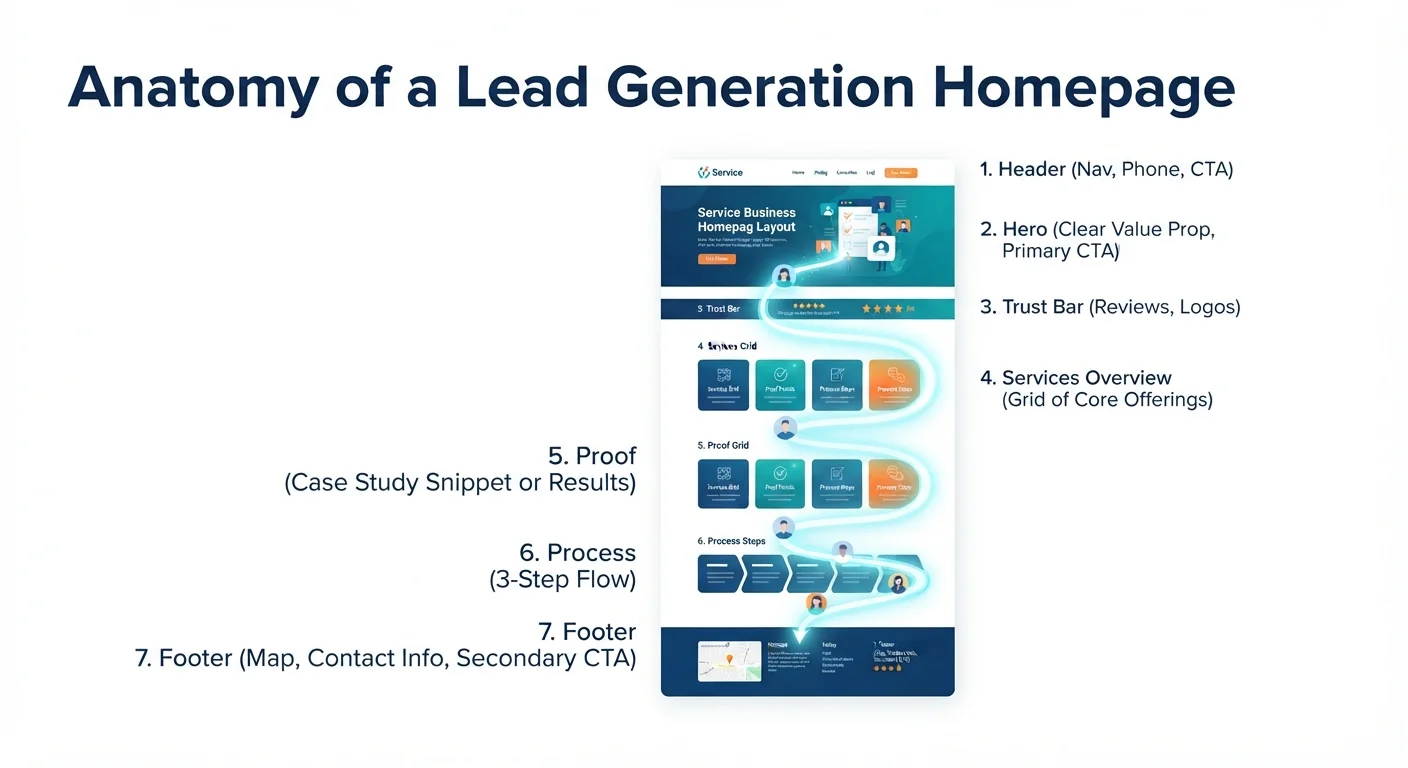
The goal is simple: explain what you do, build trust, and move visitors toward contact or service pages.
Best for
- Local service businesses
- Agencies
- Consultants
- Clinics
- Schools
- Professional firms
- Home service businesses
- B2B service providers
Recommended homepage layout
- Header with clear navigation and CTA
- Hero section with value proposition
- Trust strip or proof
- Main services overview
- Why choose us section
- Process section
- Portfolio, case studies, or results
- Testimonials
- FAQ
- Final CTA
- Footer
Hero section example
Headline: Websites for service businesses that need more leads
Subheading: We design fast, SEO-friendly websites that help local businesses get more calls, quote requests, and bookings.
CTA: Get a free website audit
Proof: 50+ projects completed
Why this layout works
It answers the biggest questions early:
- What do you do?
- Why should I trust you?
- What services do you offer?
- How does the process work?
- What should I do next?
If your homepage does not answer those questions clearly, visitors may leave even if your service is good.
Related: 10 Features Every Business Website Needs
Layout 2: Service page layout
Every important service should have its own page.
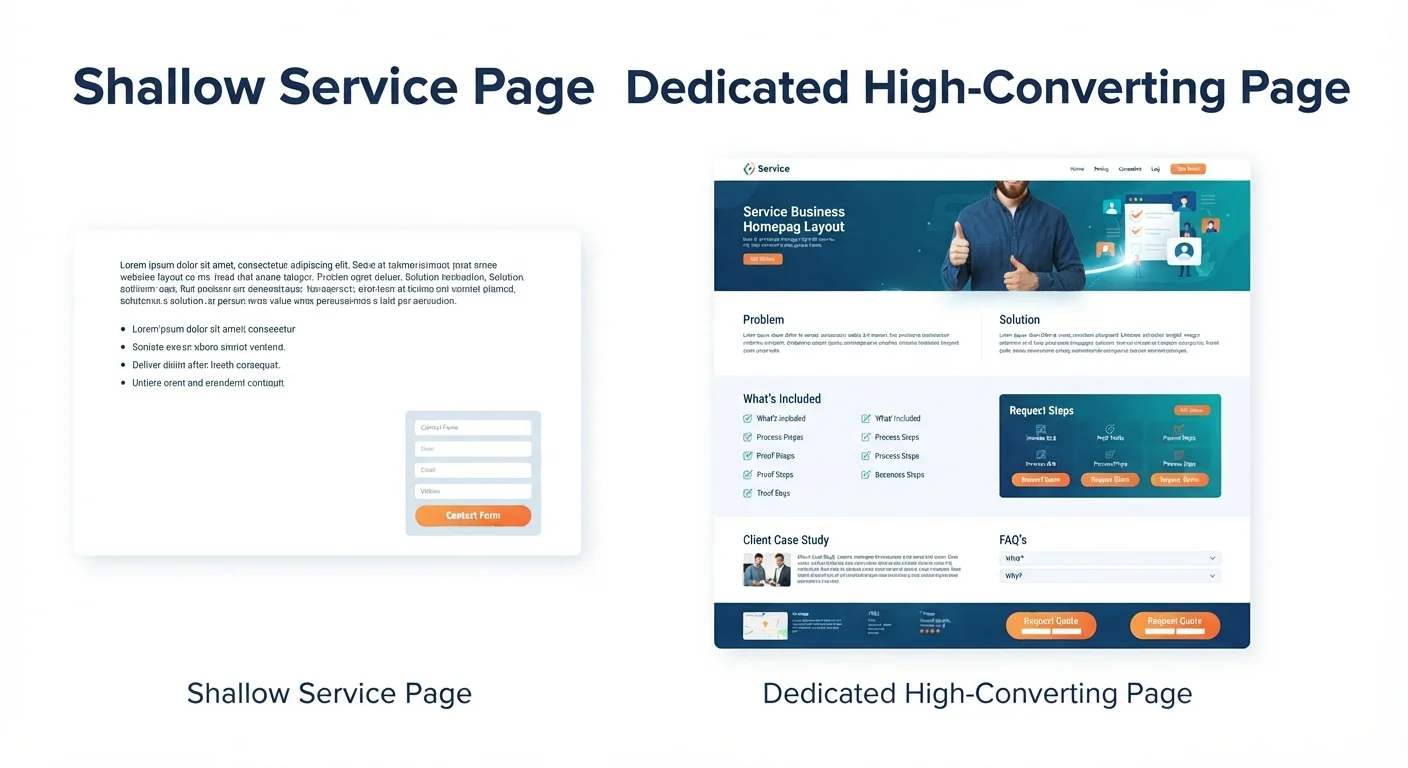
A services overview page is useful, but it is not enough for SEO or conversions.
Best for
- Businesses with multiple services
- SEO-focused websites
- Agencies
- Consultants
- Clinics
- Contractors
- Software service providers
Recommended service page layout
- Service-specific hero section
- Problem section
- Solution overview
- What is included
- Benefits or outcomes
- Process
- Examples, proof, or case study
- Pricing guidance or quote explanation
- FAQ
- CTA
Service page hero example
Headline: Small Business Website Design
Subheading: Custom, mobile-friendly websites built to help service businesses look credible, rank on Google, and generate more leads.
CTA: Request a website quote
What to include in “what is included”
For a web design service, include:
- Homepage design
- Service pages
- Contact form
- Mobile responsive layout
- Basic SEO setup
- Speed optimization
- Google Analytics setup
- Launch support
Why this layout works
Service pages work because they match buyer intent.
Someone reading a web design service page wants more detail than a homepage can provide. They need to know scope, process, timeline, and next step.
Strong service pages also help your website rank for specific keywords.
Layout 3: Local service business layout
Local service businesses need layouts that build trust quickly and make contact easy.
Examples:
- Plumbers
- Electricians
- Cleaning companies
- Salons
- Dentists
- Clinics
- Repair services
- Local consultants
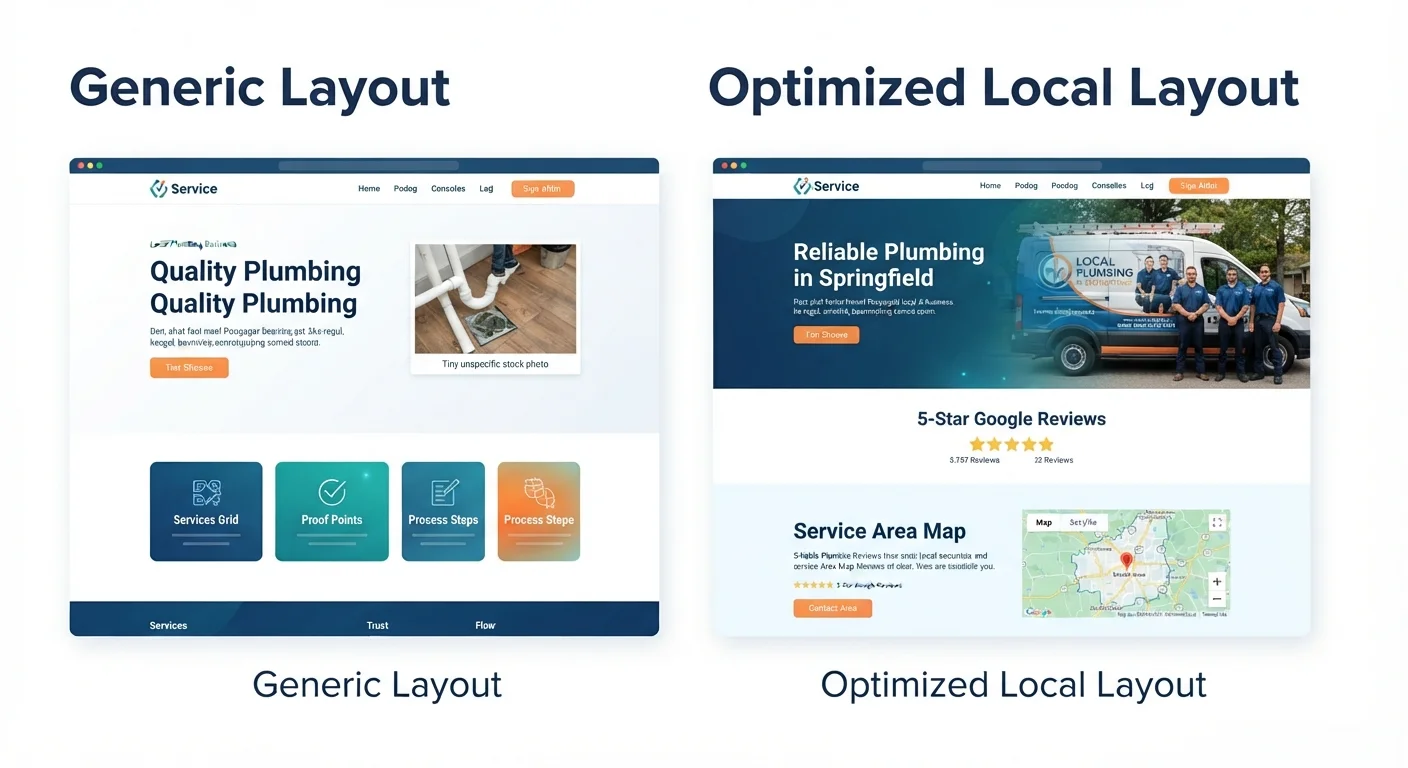
Recommended local business homepage layout
- Header with phone number and CTA
- Hero with service and location
- Reviews or rating section
- Services grid
- Service area section
- Why choose us
- Before/after or project examples
- FAQ
- Map and contact
- Final click-to-call CTA
Local hero example
Headline: Website Design Services for Small Businesses in Dhaka
Subheading: Fast, mobile-friendly websites for local businesses that need more calls, bookings, and Google visibility.
CTA: Call now / Get a free quote
Local layout essentials
Include:
- City or service area
- Phone number
- Click-to-call button
- Google reviews
- Business hours
- Address or service area
- Map if relevant
- Local testimonials
- Local keywords
Why this layout works
Local visitors often want speed and confidence.
They need to know:
- Do you serve my area?
- Are you open?
- Can I call now?
- Do other local customers trust you?
Make those answers easy to find.
Related: SEO for Local Businesses: Simple Steps to Rank and Get More Leads
Layout 4: Consultant or expert service layout
Consultants, coaches, and professional service providers need a layout that builds authority.
The visitor is often buying expertise, not only a task.
Best for
- Business consultants
- Marketing consultants
- Coaches
- Financial advisors
- Legal professionals
- Technical consultants
- Trainers
Recommended layout
- Authority-focused hero
- Who you help
- Problems you solve
- Services or packages
- Method or framework
- Proof and testimonials
- Case studies
- About/expertise section
- FAQ
- Consultation CTA
Hero example
Headline: Digital strategy for service businesses ready to grow online
Subheading: Get a clear website, SEO, and lead generation plan built around your business goals.
CTA: Book a free strategy call
Trust elements to include
Add:
- Years of experience
- Client results
- Case studies
- Methodology
- Speaking, publications, or certifications
- Testimonials
- Clear process
Why this layout works
Consulting buyers want to know why your advice is worth trusting.
A strong layout should show expertise before asking for a call.
Layout 5: Agency or studio layout
Agencies need to show service range, process, proof, and creative quality.
The layout should be polished, but still clear.
Best for
- Web design agencies
- Marketing agencies
- Branding studios
- SEO agencies
- Development studios
- Creative teams
Recommended layout
- Clear agency positioning
- Service categories
- Featured work
- Results or case studies
- Process
- Technology or capabilities
- Testimonials
- Blog/resources
- CTA
Agency hero example
Headline: Web design and SEO for small businesses that need measurable growth
Subheading: We build fast, conversion-focused websites and digital strategies that turn visitors into leads.
CTA: Start your project
Agency layout tip
Do not make the homepage only about creativity.
Show:
- What services you offer
- What results you help create
- What your process looks like
- What kinds of clients you serve
- How someone starts a project
Beautiful design gets attention. Clear structure wins leads.
Layout 6: Portfolio-first layout
A portfolio-first layout puts work examples near the top.
This is useful when the visual result matters heavily.
Best for
- Designers
- Photographers
- Architects
- Interior designers
- Branding studios
- Web design agencies
- Creative professionals
Recommended layout
- Visual hero
- Featured projects
- Services
- Case study highlights
- Process
- Testimonials
- About
- CTA
Portfolio page structure
Each project should include:
- Project name
- Client type
- Problem
- Solution
- Visuals
- Result if available
- Testimonial if available
- Related service CTA
Why this layout works
Some buyers need to see examples before reading details.
But do not rely only on visuals. Explain the strategy behind the work.
Layout 7: Landing page layout for one service
A focused landing page is best when you want visitors to take one specific action.
This layout works well for ads, email campaigns, or one high-priority service.
Best for
- Paid ads
- Lead magnets
- Free consultations
- Promotions
- One service offer
- Event registration
- Quote requests
Recommended landing page layout
- Specific headline
- Problem and promise
- Benefits
- What is included
- Proof
- Simple process
- FAQ
- Short form
- Final CTA
Landing page hero example
Headline: Get a free website audit for your service business
Subheading: Find out why your website is not generating leads and what to fix first.
CTA: Request my free audit
Landing page rule
Remove distractions.
The page should support one goal, not five.
Related: Why Your Website Is Not Getting Leads
Layout 8: Blog-supported service website
This layout is best for businesses that want organic traffic from Google.
The website uses service pages for conversion and blog posts for traffic and authority.
Best for
- SEO-focused service businesses
- Agencies
- Consultants
- B2B services
- Software service providers
- Local businesses investing in content
Recommended structure
- Homepage
- Core service pages
- Blog hub
- Topic clusters
- Case studies
- Contact page
Example topic cluster
For website design:
- Best website layouts for service businesses
- Small business website cost
- Website not getting leads
- Business website features
- Website redesign checklist
- One page vs multi page website
Each article should link to:
- Related articles
- Relevant service page
- Contact page
Why this layout works
Blog content attracts visitors at different stages of the buying journey.
Service pages convert them when they are ready.
This is the core of SEO cluster strategy.
Best homepage layout for a service business
If you want one simple structure, use this.
Section 1: Header
Include:
- Logo
- Services
- Portfolio or case studies
- Blog/resources
- Contact
- CTA button
Keep navigation simple.
Section 2: Hero
Include:
- Clear headline
- Subheading
- Primary CTA
- Secondary CTA if needed
- Trust signal
Example:
Headline: Websites that help service businesses get more leads
CTA: Get a free consultation
Section 3: Trust strip
Show:
- Review rating
- Project count
- Client logos
- Years of experience
- Key result
Section 4: Services
Show your main services with short descriptions.
Each service should link to a full service page.
Section 5: Problems you solve
This helps visitors feel understood.
Examples:
- Your website looks outdated
- You are not getting leads
- Your site is slow
- Your business is hard to find on Google
- Your contact form gets no inquiries
Section 6: Process
Show 3-5 steps:
- Discovery
- Strategy
- Design
- Development
- Launch and support
Process reduces uncertainty.
Section 7: Proof
Add:
- Testimonials
- Portfolio
- Case studies
- Results
Section 8: FAQ
Answer common questions:
- How much does it cost?
- How long does it take?
- What is included?
- Do you provide support?
- Can I update the website myself?
Section 9: Final CTA
End with a clear next step:
Ready to improve your website? Request a free website audit.
Best service page layout
Your service pages should be more detailed than your homepage.
Recommended service page structure
| Section | Purpose |
|---|---|
| Hero | State the specific service and outcome |
| Problem | Show that you understand the visitor’s pain |
| Solution | Explain how your service helps |
| What’s included | Clarify deliverables |
| Benefits | Show business value |
| Process | Explain how working together works |
| Proof | Build trust |
| FAQ | Remove objections |
| CTA | Invite action |
Service page example outline
For “Website Redesign”:
- Hero: Website redesign for service businesses that need more leads
- Problem: Outdated site, slow speed, weak SEO, low conversion
- Solution: Strategy-led redesign
- Included: UX, copy, design, development, SEO setup
- Process: Audit, plan, design, build, launch
- Proof: Before/after examples
- FAQ: Cost, timeline, SEO protection
- CTA: Request redesign audit
Related: Website Redesign Checklist Before Hiring an Agency
Best contact page layout
Your contact page should reduce hesitation.
Do not make it feel like a dead end.
Contact page should include
- Short heading
- Friendly explanation
- Simple form
- Phone or WhatsApp
- Business location or service area
- Response time
- Trust signal
- FAQ
Contact page example
Headline: Tell us about your project
Text: Share your website or SEO goals. We usually reply within 24 hours with next steps.
Fields: Name, email, service needed, message
CTA: Request consultation
Contact page tip
Tell visitors what happens after they submit.
Example:
After you send the form, we will review your message and reply within 24 hours with questions, recommendations, or next steps.
This removes uncertainty.
Layout mistakes service businesses should avoid
Mistake 1: Starting with a vague hero section
“Welcome to our website” or “We provide quality services” is not enough.
Say what you do and who you help.
Mistake 2: Hiding services below too much content
Visitors should find services quickly.
Mistake 3: Making the homepage do everything
Use the homepage to guide. Use service pages to explain.
Mistake 4: No proof near CTAs
Place testimonials, reviews, or results close to contact buttons.
Mistake 5: No mobile-first thinking
A layout that looks good on desktop can fail on mobile.
Mistake 6: Too many CTAs
Do not ask visitors to do five things.
Pick one primary action.
Mistake 7: No SEO structure
If every service is squeezed into one page, your SEO potential is limited.
Related: One Page Website vs Multi Page Website: Which Is Better?
Service business website layout checklist
Use this to audit your site.
Homepage
- Clear headline
- Service and audience are obvious
- CTA above the fold
- Trust signal near top
- Services link to full pages
- Process is explained
- Testimonials are visible
- FAQ is included
Service pages
- One page per important service
- Clear service-specific headline
- Benefits and deliverables explained
- Process included
- Proof included
- FAQ included
- CTA included
Contact and conversion
- Contact page is easy to find
- Form is short
- Phone or WhatsApp is clickable
- Response time is stated
- CTA appears on every key page
SEO
- URLs are descriptive
- Headings are clear
- Internal links connect related pages
- Blog posts support service pages
- Local keywords are included where relevant
Mobile
- Buttons are easy to tap
- Text is readable
- Forms work
- Page loads fast
- Navigation is simple
Frequently asked questions
What is the best website layout for a service business?
The best layout is usually a lead generation homepage with dedicated service pages. The homepage introduces the business and guides visitors, while service pages explain each offer in detail and target specific SEO keywords.
Should a service business have one page or multiple pages?
Most service businesses should have multiple pages if they want SEO traffic and consistent leads. A one page website can work for a simple offer, but it becomes limiting as the business grows.
Read more: One Page Website vs Multi Page Website: Which Is Better?
What should be above the fold on a service business website?
Above the fold, include a clear headline, short subheading, primary CTA, and trust signal. Visitors should immediately understand what you do, who you help, and what to do next.
How many services should I show on the homepage?
Show your main 3-6 services on the homepage. Each service should link to a dedicated service page with more detail.
Should I include pricing on my service website?
If possible, include pricing guidance. You can use ranges, starting prices, or “custom quote based on scope.” Pricing guidance helps qualify leads and reduces uncertainty.
What layout is best for local SEO?
For local SEO, use a homepage that clearly includes your service and location, dedicated service pages, location pages if needed, reviews, contact details, and local business information.
Do service businesses need a blog?
A blog is useful if you want organic traffic. Blog posts help answer buyer questions, support internal linking, and build authority around your services.
What is the biggest layout mistake service businesses make?
The biggest mistake is making the website look nice but unclear. Visitors should not have to guess what you do, who you serve, or how to contact you.
Final recommendation
For most service businesses, use this layout strategy:
- Build a clear lead generation homepage
- Create one detailed page for each major service
- Add proof and trust signals throughout the site
- Make contact easy on every page
- Support service pages with helpful blog content
- Track leads and improve over time
A good layout does not just organize content. It guides visitors toward confidence and action.
Need help choosing the right layout for your service business website? Contact TheWebPal for a free website layout review, homepage audit, or redesign recommendation.