Before you buy a website design package, you need to know what is actually included.
Two agencies can both say they offer a “business website package,” but the deliverables may be completely different.
One package may include only a template setup and a contact form. Another may include strategy, custom design, copywriting guidance, SEO setup, speed optimization, analytics, launch support, and training.
The price alone does not tell you the value.
This guide explains what a professional website design package should include, what may cost extra, and how to compare packages before hiring a designer or agency.
Quick answer: what should be included in a website design package?
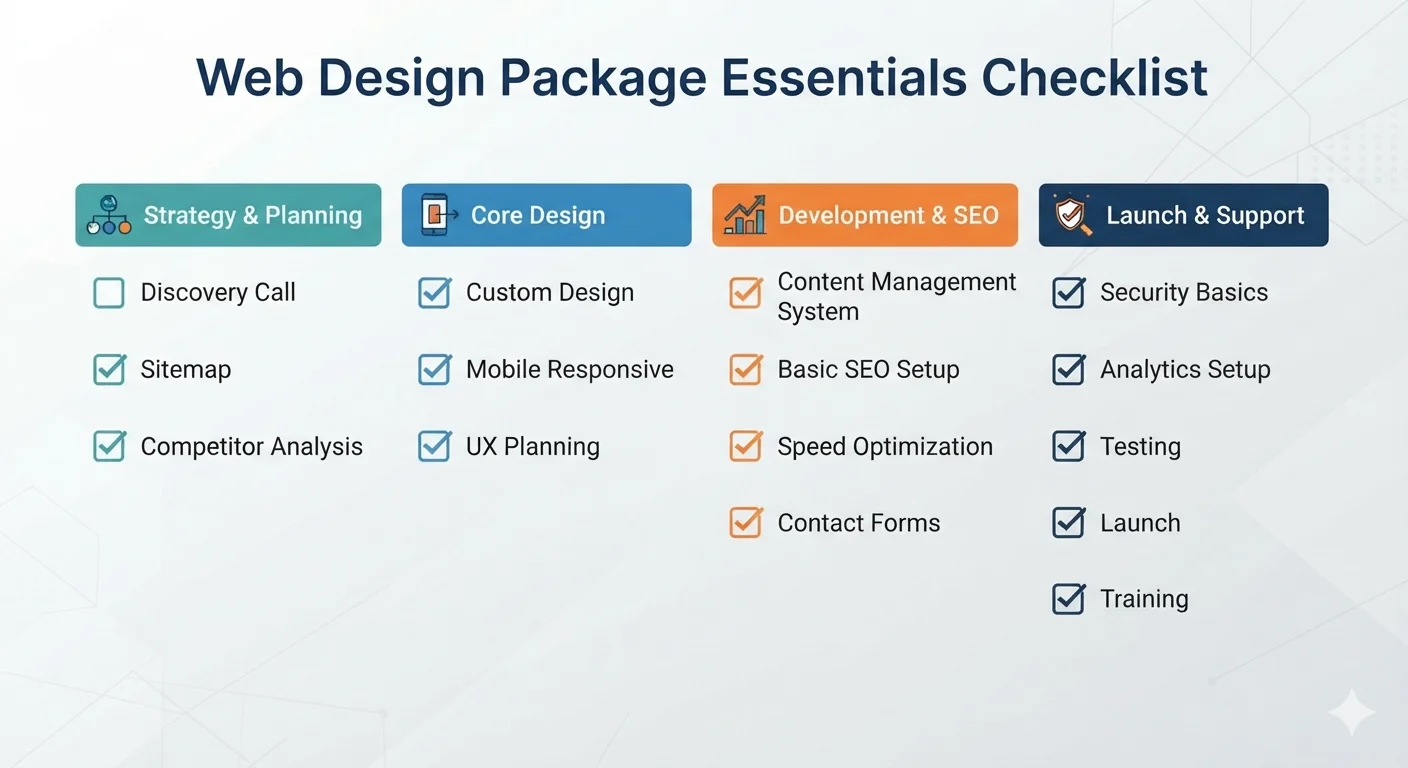
A complete website design package should include:
- Discovery and strategy
- Sitemap and page planning
- Core website pages
- Mobile responsive design
- UX and conversion planning
- Content guidance or copywriting
- Visual design and branding support
- Website development
- Basic SEO setup
- Speed optimization
- Contact forms and lead capture
- Security basics
- Analytics and tracking
- Testing and launch
- Training and post-launch support
Not every package includes all of these. That is why you should ask for a clear deliverables list before paying.
Why package details matter
A website package is not just “design.”
For a business website to work, it needs strategy, structure, content, technical setup, SEO, speed, trust, and conversion planning.
If those pieces are missing, the website may look nice but fail to generate leads.
Common package confusion
Business owners often assume a web design package includes:
- Writing all website content
- SEO optimization
- Hosting
- Domain setup
- Logo design
- Maintenance
- Blog setup
- Analytics
- Speed optimization
- Future edits
But many packages do not include these by default.
What happens when details are unclear
Unclear packages can lead to:
- Extra charges
- Delayed launch
- Weak SEO setup
- Missing pages
- Poor mobile experience
- No analytics
- No support after launch
- Content problems
- Disagreements about scope
The solution is simple: confirm deliverables before the project starts.
1. Discovery and strategy
Every good website design package should start with discovery.
This is where the designer or agency learns about your business, audience, goals, services, competitors, and current website problems.
Discovery should cover
- Business goals
- Target audience
- Main services or products
- Current website issues
- Competitors
- Brand positioning
- Lead generation goals
- SEO goals
- Required features
- Timeline and budget
Why discovery matters
Without discovery, the website is based on guesses.
A designer may create something visually attractive, but it may not match your customers, offers, or sales process.
Questions your agency should ask
A good agency should ask:
- Who is your ideal customer?
- What action should visitors take?
- Which services matter most?
- What problems do customers ask about?
- What makes your business different?
- What pages are most important?
- How will success be measured?
If an agency jumps directly into colors and layouts, be careful.
2. Sitemap and page planning
A sitemap is the page structure of your website.
It shows what pages will be included and how they connect.
A basic small business sitemap may include
- Homepage
- About
- Services
- Individual service pages
- Portfolio or case studies
- Blog
- Contact
- Privacy policy
Why sitemap planning matters
Good page structure helps:
- Visitors find information
- Search engines understand your site
- Blog posts link to services
- Service pages rank for keywords
- The website grow over time
What to confirm
Ask:
- How many pages are included?
- Are service detail pages included?
- Is a blog included?
- Is a contact page included?
- Are legal pages included?
- Are landing pages included?
- What happens if we need more pages?
Page count is one of the biggest package differences.
Related: One Page Website vs Multi Page Website: Which Is Better?
3. Core website pages
Your package should clearly list the pages included.
A business website usually needs more than a homepage.
Essential pages
Most small business websites should include:
- Homepage
- About page
- Services page
- Contact page
- Privacy policy
Growth-focused pages
Better packages may also include:
- Individual service pages
- Portfolio
- Case studies
- Testimonials
- FAQ page
- Blog index
- Blog post template
- Pricing or packages page
- Location pages
Why individual service pages matter
If your business offers multiple services, each major service should have its own page.
This helps with:
- SEO
- Buyer education
- Internal linking
- Conversion
- Clearer proposals
For example, a web design agency may need pages for:
- Website design
- Website redesign
- Local SEO
- Ecommerce development
- WordPress maintenance
- Custom web development
One generic services page usually is not enough for strong SEO.
4. Mobile responsive design
Mobile responsive design should be included in every modern website package.
Your website should work well on phones, tablets, laptops, and desktops.
Mobile design should include
- Readable text
- Tap-friendly buttons
- Simple mobile navigation
- Fast mobile loading
- Forms that work on small screens
- Images that resize properly
- Click-to-call links if relevant
What to ask
Ask:
- Will the site be designed mobile-first?
- Will you test on real mobile sizes?
- Will forms work properly on mobile?
- Will the navigation be easy to use?
- Will phone numbers be clickable?
Many visitors will experience your site on mobile first. This should not be treated as an afterthought.
5. UX and conversion planning
Website design is not only about colors and layout.
It should guide visitors toward action.
Conversion planning should include
- Clear homepage message
- Strong call-to-action
- Trust signals
- Logical page flow
- Short contact forms
- CTA placement
- FAQ sections
- Service page structure
- Mobile conversion path
Good CTA examples
Use specific CTAs:
- Get a free website audit
- Request a website quote
- Book a free consultation
- Start your project
- Get your SEO review
Avoid vague CTAs:
- Submit
- Click here
- Learn more
Why this matters
A beautiful website can still fail if visitors do not know what to do next.
For deeper lead-generation planning, read: Why Your Website Is Not Getting Leads
6. Content guidance or copywriting
Content is one of the most important parts of a website project.
It is also one of the most common things missing from design packages.
Content options
A package may include:
- No copywriting
- Light content editing
- Content guidance
- Full website copywriting
- SEO copywriting
- Blog writing
These are very different levels of support.
What content should cover
Your content should explain:
- What you do
- Who you help
- What problems you solve
- What is included
- Why customers trust you
- What results are possible
- What the next step is
Content assets to prepare
Prepare:
- Service descriptions
- About text
- Testimonials
- FAQs
- Portfolio details
- Contact information
- Brand story
- Team bios
- Photos
What to ask
Ask:
- Is copywriting included?
- How many pages of copy are included?
- Do you help rewrite existing content?
- Do you write SEO-friendly headings?
- Do you provide blog content?
- What do you need from us?
Do not assume copywriting is included unless it is written in the proposal.
7. Visual design and branding support
Your website design should match your brand and create trust.
Design should support clarity, not distract from it.
Design deliverables may include
- Homepage design
- Inner page design
- Service page layout
- Blog layout
- Contact page layout
- Color palette
- Typography
- Button styles
- Image direction
- Basic brand consistency
Branding may or may not include
Some packages include light brand styling. Others include full branding.
Full branding may include:
- Logo design
- Brand strategy
- Color palette
- Typography system
- Brand guidelines
- Social media templates
- Business card design
These are usually separate from website design.
What to ask
Ask:
- Is the design custom or template-based?
- How many design concepts are included?
- How many revision rounds are included?
- Is logo design included?
- Are brand guidelines included?
- Who provides images?
Custom design costs more than template customization, but it can create a stronger brand impression.
8. Website development
Development is the technical build of the website.
This is where the approved design becomes a working website.
Development should include
- Responsive page build
- Navigation setup
- CMS setup if needed
- Forms
- Blog setup if included
- Basic animations if included
- Browser compatibility
- Technical cleanup
- Launch preparation
Platform options
Your site may be built with:
- WordPress
- Shopify
- Webflow
- Astro
- Next.js
- Custom code
- Website builders
What to ask
Ask:
- What platform will you use?
- Why is that platform best for us?
- Can we edit content ourselves?
- Who owns the website?
- Is the code portable?
- Are plugins or apps required?
- What are the ongoing costs?
The best platform depends on your goals, budget, editing needs, and growth plans.
9. Basic SEO setup
Every professional website design package should include basic SEO setup.
This does not mean full monthly SEO, but the site should launch with a clean SEO foundation.
Basic SEO should include
- SEO-friendly URLs
- Page titles
- Meta descriptions
- Proper heading structure
- Image alt text
- Internal links
- Sitemap
- Robots.txt if needed
- Google Search Console setup
- Basic schema where relevant
SEO extras may include
These may cost extra:
- Keyword research
- Competitor research
- Blog strategy
- Local SEO
- Technical SEO audit
- Content writing
- Backlink strategy
- Monthly SEO reporting
What to ask
Ask:
- What exactly is included under SEO?
- Do you research keywords?
- Do you write title tags and meta descriptions?
- Do you submit the sitemap?
- Do you protect existing URLs during redesign?
- Do you set up Search Console?
“SEO included” can mean many things. Ask for specifics.
Related: SEO for Local Businesses: Simple Steps to Rank and Get More Leads
10. Speed optimization
Website speed affects user experience, conversions, and SEO.
A good design package should include basic speed optimization.
Speed optimization should include
- Compressed images
- Proper image sizes
- Lazy loading if appropriate
- Caching setup
- Lightweight design choices
- Plugin cleanup if WordPress
- Performance testing
- Reliable hosting recommendation
Common speed problems
- Huge images
- Too many plugins
- Heavy page builders
- Cheap hosting
- Unused scripts
- Too many animations
- No caching
What to ask
Ask:
- Will you optimize images?
- Will you test page speed?
- What performance score do you target?
- Will the site be fast on mobile?
- What hosting do you recommend?
Speed should be part of the build, not something fixed after launch.
11. Contact forms and lead capture
If your website should generate leads, contact forms must be included.
But a form alone is not enough. It must be simple, tested, and connected to the right email or system.
Lead capture should include
- Contact form
- Form success message
- Email notifications
- Spam protection
- Required fields setup
- Mobile testing
- Optional CRM integration
- Optional newsletter signup
Recommended form fields
Keep it short:
- Name
- Service needed
- Message
You can ask more questions after the first contact.
What to ask
Ask:
- How many forms are included?
- Will forms be tested?
- Where do submissions go?
- Is spam protection included?
- Is CRM integration included?
- Is a thank-you page included?
A broken or overly long form can quietly kill leads.
12. Security basics
Security should be included in every professional website package.
Even a simple business website needs protection.
Security basics include
- SSL certificate
- Secure admin login
- Strong passwords
- Spam protection
- Backup setup
- Plugin/theme updates if WordPress
- Malware protection if needed
- Secure hosting recommendation
What to ask
Ask:
- Is SSL included?
- Are backups included?
- Who handles updates?
- What security tools are used?
- What happens if the site is hacked?
- Is maintenance required?
For WordPress and ecommerce websites, security maintenance is especially important.
13. Analytics and conversion tracking
Your website should not launch without tracking.
You need to know where visitors come from and which actions they take.
Tracking should include
- Google Analytics 4
- Google Search Console
- Form submission tracking
- Phone click tracking
- Email click tracking
- CTA button tracking
- Thank-you page tracking if used
What to measure
Track:
- Visitors
- Traffic sources
- Top pages
- Search queries
- Form submissions
- Phone clicks
- Quote requests
- Booking clicks
What to ask
Ask:
- Is Google Analytics included?
- Is Search Console included?
- Will form submissions be tracked?
- Will phone clicks be tracked?
- Will you show us how to read reports?
Analytics helps you improve the website after launch.
14. Testing and launch
Launch is not just pressing a button.
Your package should include proper testing before the site goes live.
Testing should include
- Mobile testing
- Desktop testing
- Browser testing
- Form testing
- Link checking
- Speed testing
- SEO metadata review
- 404 checks
- Redirect checks if redesigning
- Sitemap check
Launch should include
- Domain connection
- Hosting setup
- SSL activation
- Final backup
- Sitemap submission
- Analytics check
- Form delivery check
- Post-launch review
What to ask
Ask:
- What is your launch checklist?
- Who connects the domain?
- Who sets up hosting?
- Will you test forms after launch?
- Will redirects be handled?
- How long is post-launch support?
Launch quality matters. Small mistakes can affect leads and SEO.
15. Training and post-launch support
After the website launches, you should know how to use it.
A good package includes training or documentation.
Training may include
- How to edit pages
- How to add blog posts
- How to update images
- How to check form submissions
- How to view analytics
- How to request support
Post-launch support may include
- 7 days support
- 30 days support
- Bug fixes
- Minor edits
- Website maintenance plan
- Monthly reporting
- Ongoing SEO/content support
What to ask
Ask:
- Is training included?
- Is documentation included?
- How long is free support?
- What counts as a bug?
- What counts as a new request?
- What does maintenance cost?
Support terms should be clear before launch.
Website design package comparison table
Use this table to compare packages.
| Feature | Basic package | Professional package | Growth package |
|---|---|---|---|
| Pages | 3-5 | 5-10 | 10+ |
| Design | Template | Custom or semi-custom | Custom |
| Copywriting | Not included | Guidance/editing | Included or add-on |
| SEO setup | Basic | Strong foundation | Keyword-focused |
| Speed optimization | Basic | Included | Advanced |
| Analytics | Optional | Included | Included with tracking |
| Service pages | Limited | Included | Expanded |
| Blog | Optional | Included | Included with strategy |
| Support | Limited | 30 days | Ongoing plan |
| Best for | Starter sites | Small businesses | Lead generation and SEO |
The right package depends on your goals.
If your website only needs to exist, a basic package may be fine. If it needs to bring leads, choose a professional or growth-focused package.
What may cost extra?
These items are often not included in standard website packages:
- Logo design
- Brand strategy
- Full copywriting
- Blog writing
- Professional photography
- Video production
- Paid stock images
- Ecommerce setup
- Booking system
- CRM integration
- Email marketing setup
- Advanced SEO
- Monthly maintenance
- Hosting
- Domain purchase
- Premium plugins or apps
- Ongoing content updates
Always ask what is included and what is extra.
Red flags in website design packages
Be careful if a package:
- Does not list included pages
- Says “SEO included” without details
- Has no revision policy
- Does not mention mobile design
- Does not include launch testing
- Does not clarify ownership
- Has no support terms
- Does not mention analytics
- Uses vague deliverables
- Promises guaranteed rankings
- Avoids talking about content
A professional package should be easy to understand.
Questions to ask before buying a website design package
Ask these before signing:
- How many pages are included?
- Is the design custom or template-based?
- Is copywriting included?
- Is SEO included? What exactly?
- Is mobile design included?
- Is hosting included?
- Is domain setup included?
- Are forms included?
- Is analytics setup included?
- Is speed optimization included?
- How many revisions are included?
- Who owns the website?
- Can I edit the site myself?
- Is training included?
- What support is included after launch?
- What costs extra?
If the answers are unclear, ask for a written scope.
Recommended package for small businesses
For most small businesses, a good website design package should include:
- Discovery call
- Sitemap
- 5-10 pages
- Homepage
- About
- Services
- 2-5 service pages
- Contact page
- Blog setup
- Mobile responsive design
- Basic SEO
- Speed optimization
- Contact form
- Google Analytics
- Google Search Console
- Launch support
- 30 days post-launch support
This gives you a solid foundation for credibility, SEO, and lead generation.
If your business depends heavily on leads, add:
- Copywriting
- Local SEO
- Case studies
- Conversion tracking
- Ongoing blog content
- Monthly maintenance
Related: Best Website Layouts for Service Businesses
Website design package checklist
Use this checklist before you hire.
Strategy
- Discovery included
- Target audience discussed
- Business goals defined
- Competitors reviewed
- Sitemap planned
Design
- Custom or template approach clarified
- Mobile responsive design included
- Revisions included
- Brand styling included
- CTA layout planned
Content
- Copywriting responsibility clarified
- Page content list prepared
- Service descriptions included
- Testimonials collected
- FAQs included
Development
- Platform chosen
- Pages listed
- Forms included
- Blog setup included
- CMS editing included
SEO and performance
- SEO titles included
- Meta descriptions included
- Image alt text included
- Sitemap included
- Speed optimization included
- Search Console included
Launch and support
- Domain/hosting responsibilities clear
- SSL included
- Forms tested
- Analytics installed
- Training included
- Support period clear
Frequently asked questions
What should a basic website design package include?
A basic package should include a few core pages, responsive design, contact form, basic SEO setup, mobile testing, launch support, and simple training.
It may not include copywriting, advanced SEO, branding, ecommerce, or ongoing maintenance.
What should a professional website package include?
A professional package should include discovery, sitemap planning, custom or semi-custom design, 5-10 pages, service pages, mobile responsive development, basic SEO, speed optimization, analytics, forms, testing, launch, and post-launch support.
Is SEO usually included in website design packages?
Basic SEO is often included, but full SEO strategy usually costs extra.
Ask whether the package includes keyword research, titles, meta descriptions, headings, URLs, image alt text, internal links, sitemap, Search Console, and local SEO.
Is copywriting included in web design packages?
Sometimes, but not always.
Many packages require the client to provide content. Others include copywriting as an add-on. Always confirm this early because content delays can slow the whole project.
Should hosting be included in a website design package?
It depends.
Some agencies include hosting. Others recommend hosting but let you own the account. In many cases, it is better for the client to own the domain and hosting account, even if the agency manages setup.
How many pages should be included?
For a small business website, 5-10 pages is a practical starting point.
SEO-focused websites may need more pages, especially individual service pages and blog content.
How much should a website design package cost?
Basic packages may cost under $2,000. Professional small business packages often cost $3,000-$8,000. Growth-focused packages with SEO, copywriting, and conversion strategy can cost $8,000-$15,000+.
Read more: How Much Does a Small Business Website Cost in 2026?
What is the most important thing to confirm before buying a package?
Confirm the scope.
You should know exactly how many pages, revisions, features, SEO tasks, content responsibilities, launch tasks, and support days are included.
Final recommendation
A strong website design package should include more than a homepage and a contact form.
For a business website that can generate leads, look for a package that includes:
- Strategy
- Clear page structure
- Mobile responsive design
- Strong service pages
- Conversion-focused CTAs
- Basic SEO
- Speed optimization
- Lead capture
- Analytics
- Launch and support
Do not compare packages only by price. Compare what is included, what is missing, and whether the package supports your business goals.
Need help choosing the right website package? Contact TheWebPal for a free package recommendation, website audit, or project estimate based on your goals.