Your homepage is your digital storefront.
For local businesses, it is often the deciding moment for a visitor to call, visit, or leave.
Most local customers are not browsing for fun. They are usually searching with intent:
- “plumber near me”
- “best dentist in [city]”
- “web design agency in [location]”
- “salon open today”
When they land on your homepage, they want fast answers:
- Do you offer the service I need?
- Do you serve my area?
- Can I trust you?
- How do I contact you?
- How quickly can you help?
A strong homepage structure answers these questions in the right order.
This guide covers the best homepage structure for local businesses, the sections that matter most, common layout mistakes, and a ready-to-use framework you can follow.
Quick answer: best homepage structure for local businesses
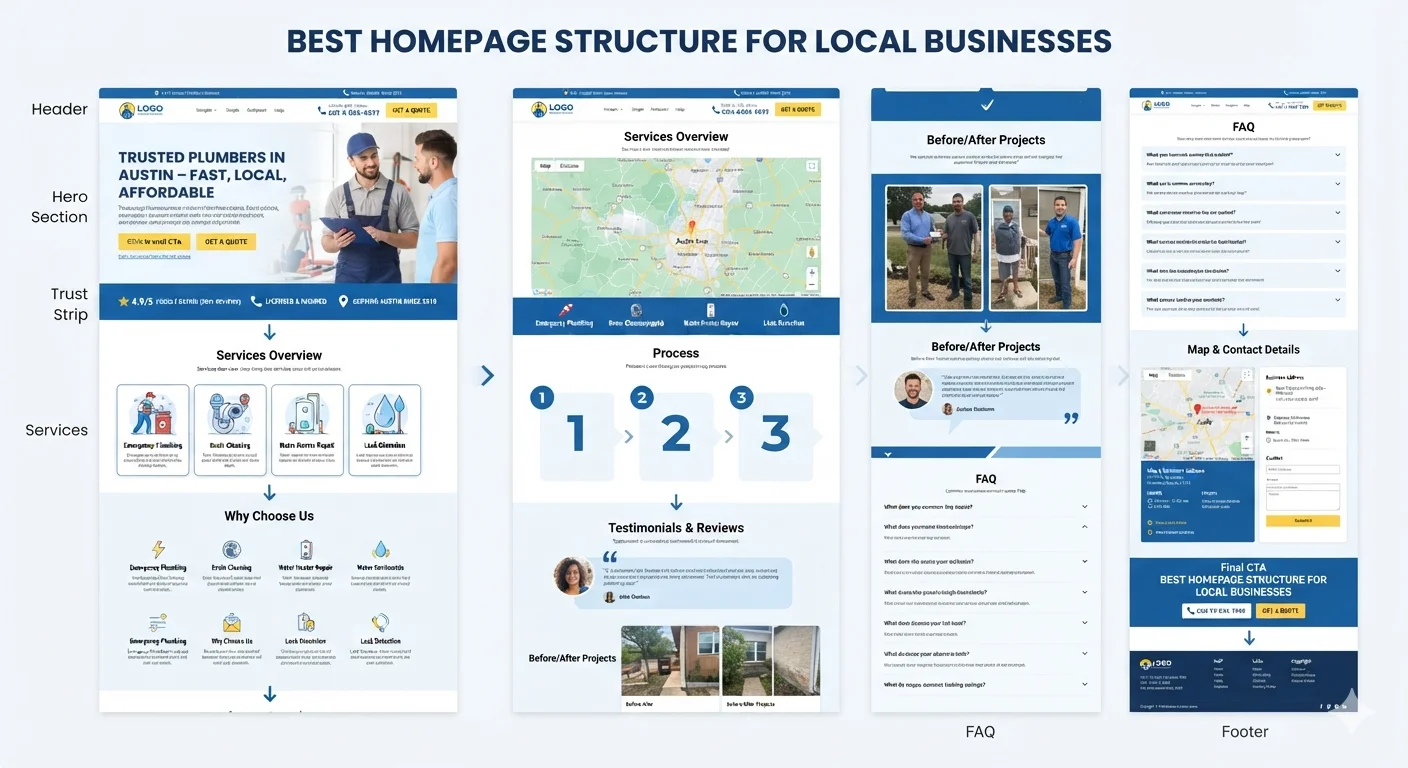
The best homepage for a local business follows this structure:
- Header with phone number and CTA
- Hero with service and city
- Trust strip (reviews, ratings, experience)
- Services overview
- Why choose us
- Service area or local proof
- Process or how it works
- Testimonials and reviews
- Before/after or project examples
- FAQ
- Map and contact details
- Final click-to-call or quote CTA
- Footer
This structure works because it gives local visitors what they want: speed, clarity, trust, and a simple way to take the next step.
What makes a great local business homepage?
A great local homepage is built around three things:
- Speed of understanding – visitors know within seconds if you can help
- Local relevance – city, service area, and trust signals are obvious
- Easy contact – calling, messaging, or booking takes one tap
Most local visitors are not ready to read long copy. They want to scan, confirm, and act.
Your homepage should support that behavior.
A strong local business homepage should:
- State the service and location above the fold
- Make the phone number visible
- Show reviews, ratings, or trust signals early
- List services clearly
- Show service area or location
- Include proof (photos, case studies, testimonials)
- Make contact effortless
- Work perfectly on mobile
- Load fast on mobile data
- Support local SEO with clear structure
A homepage is not a brochure. It is a sales tool for local intent.
Section 1: Header
The header appears on every page, so it carries a lot of weight.
For a local business, the header should help visitors take action in seconds.
Header should include:
- Logo
- Main navigation (Services, About, Reviews, Contact)
- Phone number (click-to-call on mobile)
- Primary CTA button (Get quote, Book now, Call now)
Header tips:
- Keep navigation short
- Put the phone number in the top bar
- Make the CTA button stand out with color
- Use sticky header so contact is always available
Header example:
Logo | Services | About | Reviews | Contact | 📞 (123) 456-7890 | [Get a Free Quote]
Avoid burying the phone number in the footer. Local customers often want to call immediately.
Related: Mobile-Friendly Website Checklist
Section 2: Hero section
The hero is the most important section of a local business homepage.
It is the first thing visitors see, and it usually decides whether they stay or leave.
A local business hero should include:
- Clear headline (service + audience)
- Subheading (benefit or outcome)
- Primary CTA (call, book, or quote)
- Secondary CTA (WhatsApp, directions, learn more)
- Trust signal (reviews, years in business, certifications)
- Local relevance (city or service area)
- Hero image or background (real work, team, or location)
Weak local hero:
“Welcome to our website. We provide quality services.”
This says nothing useful.
Strong local hero:
Headline: Trusted Plumbers in Austin – Fast, Local, Affordable
Subheading: Same-day plumbing repairs, drain cleaning, and water heater services for Austin homeowners. Licensed, insured, and rated 4.9★ by 500+ local customers.
Primary CTA: Call (512) 555-0123
Secondary CTA: Get a Free Quote
Local hero formula:
[Service] in [City] – [Main Benefit or Promise]
Examples:
- Dentist in Boston – Gentle, Affordable Family Dental Care
- Web Design Agency in Dhaka – Lead-Generating Websites for Local Businesses
- Salon in Miami – Hair, Nails & Skin Care You Can Trust
- HVAC Repair in Phoenix – 24/7 Emergency Service, Same-Day Fixes
Hero checklist:
- Service is clear
- City or service area is visible
- Main benefit is stated
- Primary CTA is obvious
- Phone number is clickable on mobile
- Trust signal is included
- Hero image is relevant and fast-loading
If a visitor cannot understand what you do within 5 seconds, the hero is too weak.
Section 3: Trust strip
Local customers need reassurance before they contact you.
The trust strip sits right below the hero and answers the question: “Can I trust this business?”
Trust strip can include:
- Google review rating
- Number of reviews
- Years in business
- Number of customers served
- “Licensed & insured” badges
- Certifications
- Industry awards
- Major brand logos (if relevant)
- “Family-owned” or “Locally owned” tag
Trust strip example:
⭐ 4.9/5 on Google (500+ reviews) | Serving Austin since 2010 | Licensed & Insured | 24/7 Emergency Service
Why this matters
Most local buyers compare 2-3 businesses before calling. Visible trust signals help you stand out and reduce hesitation.
Trust strip tips:
- Use real numbers, not vague claims
- Show review platform (Google, Yelp, Facebook)
- Add a clickable link to your reviews page
- Keep the design simple and scannable
Section 4: Services overview
After trust, visitors want to know what you actually offer.
The services section should list your main services with short descriptions and links to full service pages.
Services section should include:
- 4-8 main services
- Short 1-2 line descriptions
- Icons or images
- Link to dedicated service page
- Optional pricing or “starting from” hint
Service card example:
Emergency Plumbing Fast repairs for leaks, burst pipes, clogged drains, and water heater issues. 24/7 service across Austin. [Learn more →]
Services section tips:
- Group related services together
- Put the most popular or profitable services first
- Use plain language, not industry jargon
- Link each service to a full page for SEO
Avoid:
- Listing 20+ services with no description
- Using only icons with no explanation
- Hiding services below long intro text
Related: One Page Website vs Multi Page Website: Which Is Better?
Section 5: Why choose us
Many local businesses look similar on paper. The “why choose us” section explains what makes you different.
This section helps visitors choose you over competitors.
Why choose us should highlight:
- Experience or specialization
- Local knowledge
- Speed (same-day, 24/7, fast response)
- Quality guarantees
- Transparent pricing
- Friendly service
- Certifications or training
- Locally owned or family-run
Example:
Why Austin Homeowners Choose Us
- 15+ years serving Austin neighborhoods
- Licensed, insured, and background-checked plumbers
- Upfront pricing – no surprise fees
- Same-day service available
- 100% satisfaction guarantee
Tips:
- Use 3-6 differentiators
- Keep each point short
- Tie each point to a customer benefit
- Avoid generic claims like “best service” without proof
Section 6: Service area or local proof
For local businesses, location matters.
Visitors want to know:
- Do you serve my city?
- Do you cover my neighborhood?
- Are you close enough for fast service?
Service area section can include:
- List of main cities or neighborhoods
- Map with service radius
- “Serving [City] and surrounding areas”
- “Proudly serving [Region] since [Year]”
Service area example:
Proudly Serving
Austin, Round Rock, Cedar Park, Pflugerville, Georgetown, Lakeway, and surrounding areas within 25 miles.
Tips:
- Mention your main service area clearly
- Add a map if your business has a physical location
- Create individual location pages if you serve many cities (good for local SEO)
Related: SEO for Local Businesses: Simple Steps to Rank and Get More Leads
Section 7: Process or how it works
Many local customers hesitate because they do not know what to expect.
A simple process section removes uncertainty.
Process section format:
- Contact us – Call or request a quote online
- Get a free estimate – We assess your needs and provide clear pricing
- Schedule service – Pick a time that works for you
- We complete the job – Fast, clean, and professional
- Pay only when satisfied – No payment until you’re happy
Process tips:
- Use 3-5 steps
- Keep each step short
- Focus on what the customer experiences
- Remove fear of the unknown
Section 8: Proof – testimonials, reviews, case studies
Trust is everything for local businesses.
Show real feedback from real customers, not just star ratings.
Proof section can include:
- Written testimonials with names and locations
- Google review screenshots
- Video testimonials
- Before/after photos
- Case study highlights
- Project galleries
Testimonial example:
“They fixed our water heater the same day we called. Honest pricing, friendly service, and very professional.” — Sarah M., Austin, TX ⭐⭐⭐⭐⭐
Tips:
- Use real names and cities
- Include photos if possible
- Mix platforms (Google, Facebook, Yelp)
- Link to full reviews page
Social proof checklist:
- Reviews from real customers
- Location included with each review
- Mix of written and video testimonials
- Link to public review profile
- Reviews are updated regularly
Section 9: Before/after or project gallery
For service-based local businesses, visuals are powerful.
Show your work so visitors can see the quality.
Project gallery can include:
- Before/after images
- Recent project photos
- Team at work
- Equipment or vehicles
- Completed jobs
Tips:
- Use real photos, not stock images
- Add short captions (problem + solution)
- Keep images optimized for fast loading
- Show variety of services
If you run a clinic, salon, restaurant, or retail store, you can also use:
- Interior photos
- Team photos
- Customer experience shots
Section 10: FAQ section
Local customers often have the same questions. Answer them on your homepage.
Common local business FAQ topics:
- What areas do you serve?
- What are your hours?
- Do you offer free estimates?
- Are you licensed and insured?
- How quickly can you start?
- Do you offer emergency service?
- What payment methods do you accept?
- Do you provide written quotes?
FAQ example:
Do you serve [City]? Yes, we serve [City] and all surrounding areas within [X] miles.
Do you offer free estimates? Yes, we provide free, no-obligation estimates for all services.
FAQ tips:
- Use real questions from customers
- Keep answers short and clear
- Use FAQ schema for SEO
- Link to detailed service pages when relevant
Related: Why Your Website Is Not Getting Leads
Section 11: Map and contact details
Make it easy for local customers to find and reach you.
Contact section should include:
- Business name
- Full address (if you have a physical location)
- Clickable phone number
- Email address
- Business hours
- Google Maps embed
- Contact form
- WhatsApp or messaging link (if used)
- Social media links
- Parking or access notes
Contact section example:
Visit Us 123 Main Street, Austin, TX 78701
Call Us 📞 (512) 555-0123
Hours Mon–Fri: 8am – 6pm Sat: 9am – 2pm Sun: Closed (24/7 emergency service available)
[Get Directions] [Send a Message]
Contact tips:
- Put contact info on every page, not just the contact page
- Make phone numbers clickable
- Add a short form for quote requests
- Tell visitors when they will get a response
Example reassurance: “We usually reply within 2 hours during business hours.”
Section 12: Final CTA
End the homepage with one clear next step.
Do not let visitors reach the bottom and wonder what to do.
Final CTA example:
Ready to Get Started? Call now for a free quote or book your service online. Fast, local, and trusted by [X]+ customers in [City].
Final CTA tips:
- Use one clear action (call, book, or quote)
- Repeat the trust signal
- Repeat the phone number
- Add a secondary option (form, WhatsApp, email)
Section 13: Footer
The footer supports the rest of the homepage.
Footer should include:
- Business name
- Address
- Phone number
- Hours
- Services links
- Service area links
- Social media
- Privacy policy
- Terms of service
- Copyright
Footer tip:
Local SEO benefits from consistent NAP (Name, Address, Phone) in the footer of every page.
Mobile-first considerations for local business homepages
Most local searches happen on phones.
Your homepage must work perfectly on mobile.
Mobile homepage checklist:
- Phone number is click-to-call
- Hero is short and clear
- CTAs are large enough to tap
- Sections stack cleanly
- Maps load fast
- Forms are short
- No popups block the page
- Reviews are easy to read
- Page loads in under 3 seconds
Mobile mistakes to avoid:
- Tiny tap targets
- Hidden phone numbers
- Slow-loading images
- Long copy with no scannable sections
- Aggressive popups
Related: Mobile-Friendly Website Checklist
Local SEO tips for your homepage
A well-structured homepage also helps you rank in local search.
Local SEO homepage checklist:
- City or service area in the H1
- City mentioned naturally in subheadings
- NAP (Name, Address, Phone) in footer
- Google Maps embedded
- Business schema markup (LocalBusiness)
- Reviews schema markup
- Service descriptions mention service area
- Internal links to location pages (if applicable)
- Image alt text includes city or service
- Meta title and description include primary city + service
Example homepage title:
Plumber in Austin, TX | Same-Day Service | [Business Name]
Example meta description:
Looking for a trusted plumber in Austin? [Business Name] offers same-day plumbing, drain cleaning, and water heater repair. Call (512) 555-0123 for a free quote.
Related: SEO for Local Businesses: Simple Steps to Rank and Get More Leads
Common homepage mistakes local businesses make
Mistake 1: Vague hero section
“Welcome to our website” wastes the most valuable real estate on your site.
Mistake 2: Hiding the phone number
If the phone number is not visible above the fold, you will lose calls.
Mistake 3: No reviews or trust signals
Without proof, visitors assume you are new, risky, or unproven.
Mistake 4: Generic copy
“We provide quality service” means nothing. Be specific about what you do and where.
Mistake 5: Slow loading
A 5-second homepage loses most mobile visitors.
Mistake 6: No clear CTA
If visitors do not know what to do next, they leave.
Mistake 7: Ignoring local SEO
Without city, service area, and structured data, you will not rank locally.
Mistake 8: Too many services
Listing 30 services confuses visitors. Focus on your main 4-8 services.
Mistake 9: No mobile optimization
A homepage that works on desktop but fails on mobile kills local leads.
Mistake 10: Outdated photos
Old or stock photos make your business feel inactive. Use real, recent images.
Homepage structure examples by local business type
Example 1: Local plumber
- Sticky header with phone number
- Hero: “Emergency Plumber in Austin – 24/7 Fast Service”
- Trust strip: 4.9★ Google rating, 15+ years, licensed
- Services: Drain cleaning, water heater, leak repair
- Why choose us
- Service area list
- 3-step process
- Customer reviews
- Before/after photos
- FAQ
- Map + contact + click-to-call
- Final CTA
Example 2: Local dentist
- Sticky header with phone number and “Book Now”
- Hero: “Gentle Family Dentistry in Boston – New Patients Welcome”
- Trust strip: 5-star reviews, years of experience, insurance accepted
- Services: Cleaning, whitening, implants, orthodontics
- Why choose us (technology, comfort, care)
- Meet the team
- Patient testimonials
- Insurance and payment info
- FAQ
- Map + contact + booking form
- Final CTA
Example 3: Local web design agency
- Sticky header with phone number and “Get a Quote”
- Hero: “Web Design for Local Businesses in Dhaka – Lead-Focused Websites”
- Trust strip: 50+ projects, 5-star reviews, 5+ years
- Services: Web design, SEO, redesign, maintenance
- Why choose us
- Service area or industries served
- Process (3-5 steps)
- Case studies and results
- Client testimonials
- FAQ
- Map + contact form + WhatsApp
- Final CTA
Example 4: Local salon
- Sticky header with phone number and “Book Now”
- Hero: “Hair & Beauty Salon in Miami – Walk-ins Welcome”
- Trust strip: 4.8★ rating, expert stylists, top products
- Services: Haircuts, color, nails, skin
- Why choose us
- Meet the team
- Gallery of styles
- Customer reviews
- FAQ (walk-ins, parking, products)
- Map + hours + booking
- Final CTA
Example 5: Local restaurant
- Sticky header with phone number and “Reserve a Table”
- Hero: image of signature dish + “Authentic Italian in Chicago”
- Trust strip: top ratings, award-winning, family-owned
- Menu highlights
- Chef’s story
- Gallery
- Reviews
- Hours and location
- Reservation form
- Final CTA
The structure stays similar. The content, images, and CTAs change.
Local business homepage checklist
Use this to audit your current homepage.
Header
- Phone number is visible
- Navigation is simple
- CTA button is clear
- Logo links to homepage
Hero
- Service is obvious
- City or service area is included
- Headline is clear
- CTA is above the fold
- Trust signal is visible
Trust
- Reviews or rating is shown
- Years of experience is mentioned
- Licenses or certifications are visible
Services
- Main 4-8 services are listed
- Each service has a short description
- Each service links to a full page
Why choose us
- Clear differentiators are listed
- Each point ties to a customer benefit
Service area
- City and nearby areas are listed
- Map is included if relevant
Process
- 3-5 simple steps are shown
- Customer experience is clear
Proof
- Real testimonials are shown
- Photos of real work are shown
- Reviews link to public profiles
FAQ
- Common questions are answered
- Answers are short and clear
Contact
- Phone is clickable
- Address is visible
- Hours are shown
- Map is embedded
- Form is short and easy
Mobile
- Phone number is click-to-call
- Buttons are large enough
- Page loads fast
- Sections stack cleanly
SEO
- City is in H1
- NAP is in footer
- Local schema is added
- Meta title and description include city + service
Frequently asked questions
What should a local business homepage include?
A local business homepage should include a clear hero with service and city, trust signals, services overview, why choose us, service area, process, testimonials, FAQ, contact details, and a clear call-to-action like phone, booking, or quote.
How do I structure a homepage for local SEO?
Use your main service and city in the H1, mention the city naturally in subheadings, add NAP (Name, Address, Phone) in the footer, embed a map, use LocalBusiness schema, and link to location or service pages. The homepage should make it obvious what you do and where you do it.
Where should I put the phone number on my homepage?
The phone number should be in the header (top bar), the hero section, the contact section, and the footer. On mobile, it must be click-to-call so visitors can tap and dial in one step.
How many services should I list on my homepage?
List your main 4-8 services with short descriptions. Each service should link to a full service page. Avoid listing 20+ services on the homepage, as it confuses visitors and weakens SEO focus.
Should a local business homepage have a blog?
A blog is useful for local SEO, but it does not need to be on the homepage. Keep the homepage focused on services, trust, and contact. Link to your blog from the main navigation.
How long should a local business homepage be?
There is no strict length. The homepage should include every section needed to build trust and generate action. For most local businesses, that means a long, scannable homepage with clear sections, not a short one.
What is the most important section of a local business homepage?
The hero section is the most important, because it decides whether visitors stay or leave. A strong hero includes the service, city, benefit, and a clear call-to-action.
How do I get more leads from my local business website?
Focus on clear messaging, fast loading, mobile optimization, visible trust signals, easy contact options, and local SEO. Test your forms, CTAs, and phone clicks regularly. Track what works and improve over time.
Do I need a contact form if I have a phone number?
Yes. Many visitors prefer to send a message instead of calling. Offer both options, and make the form short (name, phone/email, service needed, message).
What homepage mistakes cost local businesses the most leads?
The most costly mistakes are vague hero sections, hidden phone numbers, no reviews, no clear CTA, slow mobile loading, and no local SEO. Each of these can quietly reduce leads every month.
Final recommendation
The best homepage structure for local businesses is simple:
- State what you do and where
- Show you are trustworthy
- List your main services
- Make contact effortless
- Support it all with local SEO
A strong homepage is not about fancy design. It is about removing friction for local customers who are ready to call, visit, or book.
If your homepage does not answer the key questions in under 10 seconds, you are losing leads to competitors who do.
Need help reviewing or redesigning your local business homepage? Contact TheWebPal for a free homepage audit, local SEO review, or website redesign recommendation.