Choosing the wrong website platform costs small businesses thousands — in rebuilds, slow SEO, maintenance headaches, and lost leads.
Choosing the right one gives you speed, rankings, easy content updates, and room to grow for 3-5 years without a rebuild.
This is the definitive pillar guide to the best website platform for small businesses in 2026. We compare WordPress vs Next.js vs Astro vs Webflow on what actually matters: cost, speed, SEO, content workflow, hiring, maintenance, and ownership.
If you read one platform guide this year, make it this one.
Quick answer: which platform should you choose?
| Your Situation | Best Platform | Why |
|---|---|---|
| Most small businesses (blog, services, lead gen) | WordPress | Best content workflow + SEO plugins + low cost + huge talent pool |
| Content site obsessed with speed, dev available | Astro | Zero-JS default, perfect Core Web Vitals, cheap static hosting |
| SaaS, app + marketing site, React team | Next.js | Unified codebase for marketing + dashboard, interactive features |
| Design-led brand, animations matter, no dev | Webflow | Visual canvas, CMS + hosting bundled, fast to launch |
| Ecommerce-first | WordPress + WooCommerce or Shopify | Product SEO + payments + inventory complexity |
| Pre-seed startup, launch in days | Webflow / Framer | Zero dev, visual, <$50/mo |
| Publisher / newsletter | WordPress or Ghost | Publishing workflow + SEO scoring |
Default for 2026: WordPress unless you have a specific reason not to.
Full breakdowns in each support guide linked throughout this pillar.
Who this guide is for
Built for:
- Small business owners choosing a platform for a new site or rebuild
- Founders deciding between agency WordPress vs modern stack vs visual builder
- Marketers who will own content and SEO day-to-day
- Non-technical owners who want ownership without lock-in
- Developers advising clients on long-term stack choice
Works for:
- Local services (plumbers, dentists, lawyers, agencies, clinics)
- B2B services and consultants
- SaaS startups (marketing site + blog + docs)
- Ecommerce and DTC brands
- Publishers, creators, course sellers
- Non-profits and education
Related: Best Website Tech Stack for Startups
Part 1: Why platform choice matters more than design
Design can be changed in weeks. Platform dictates for years:
- How fast you publish — WordPress block editor vs Webflow Editor vs Markdown in Git vs headless CMS dashboard
- How you rank — technical SEO ceiling, Core Web Vitals baseline, schema automation, redirect control
- What you pay — $5/mo vs $212/mo per site vs $500/mo CMS + dev retainer
- Who can help you — 43% of web knows WordPress vs niche Astro talent vs React-everywhere vs Webflow-certified designers
- What you own — full export and move anywhere vs hosting lock-in vs code you maintain
A beautiful site on the wrong platform is a liability. A simple site on the right platform is an asset.
Part 2: The 4 platforms at a glance
WordPress — the open-source CMS (43% of the web)
What it is: Self-hosted CMS + themes + 60,000+ plugins. You choose hosting, own everything.
Superpower: Content workflow + SEO tooling + zero lock-in at lowest cost.
Watch out: Needs maintenance (updates, backups, security). Plugin bloat if unmanaged.
Next.js — the React full-stack framework
What it is: React framework for marketing + app + API in one codebase. Deployed on Vercel / Node.
Superpower: Interactive apps, dashboards, personalization, unified SaaS marketing + product.
Watch out: Needs React devs. CMS must be added (headless). Caching complexity if misconfigured.
Astro — the content-first static builder
What it is: Static site generator with islands architecture. Zero JS by default, framework-agnostic components.
Superpower: Fastest LCP out of the box, cheap CDN hosting, content collections in repo.
Watch out: Smaller hiring pool. Content in Markdown/Git unless you add headless CMS.
Webflow — the visual design platform + hosting
What it is: Visual canvas + CMS Collections + AWS/Fastly hosting bundled.
Superpower: Pixel-perfect design without code, animations (IX2), all-in-one billing.
Watch out: Per-site pricing, hosting lock-in, limited ecommerce / blog depth vs WordPress.
Related deep dives:
- WordPress vs Custom Website: Which Should You Choose?
- Astro vs Next.js for Business Websites
- Webflow vs WordPress for Small Business
Part 3: Head-to-head comparison (business outcomes)
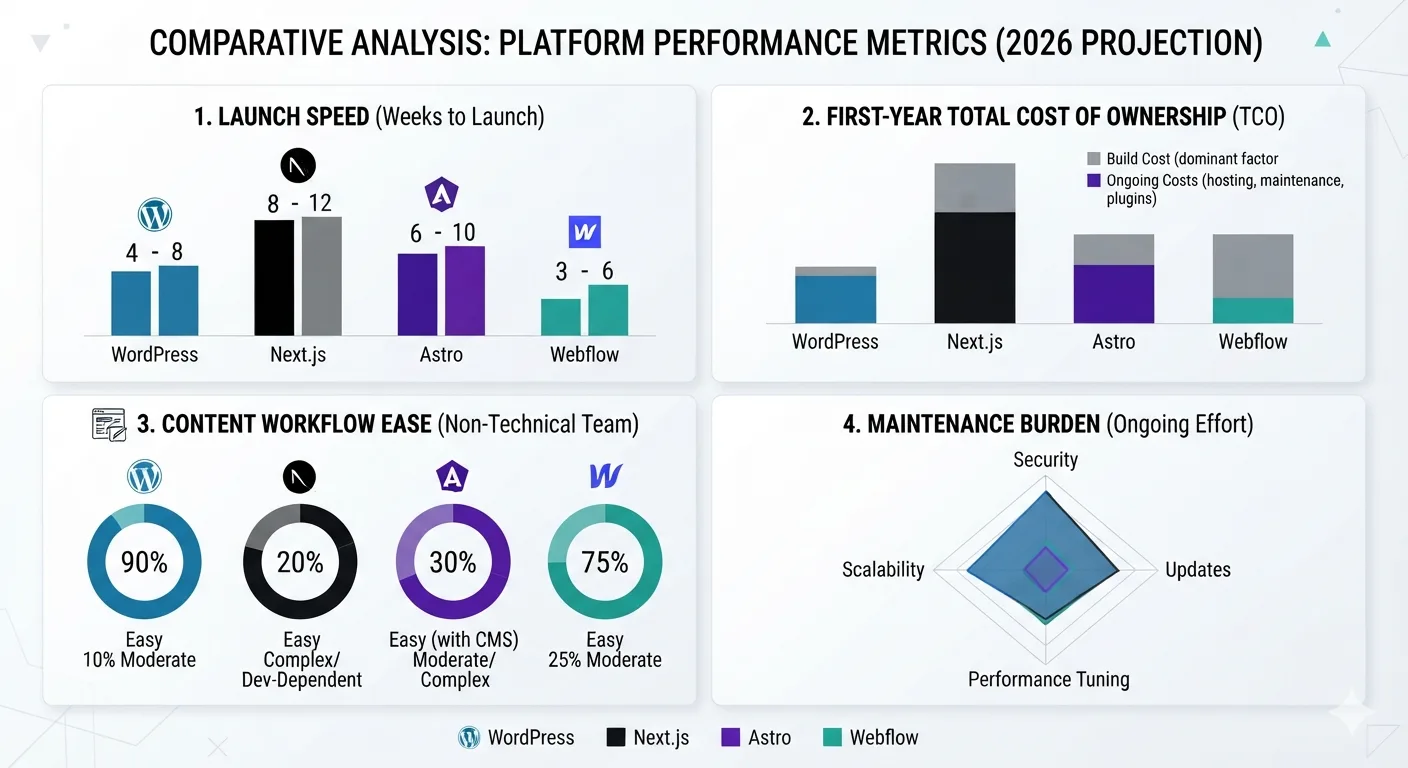
| Factor | WordPress | Next.js | Astro | Webflow |
|---|---|---|---|---|
| Best for | Content, SEO, lead gen | SaaS, apps, interactive | Marketing, blog, docs | Design-led marketing |
| Launch time | 2-8 weeks | 4-12 weeks | 2-6 weeks | 1-4 weeks |
| First-year cost | $2K-15K build + $60-600 hosting | $15K-80K build + $0-1800 hosting | $5K-25K build + $0-240 hosting | $3K-15K build + $276-2544 hosting |
| Monthly run cost | $5-50 | $0-150 | $0-20 | $23-212 per site |
| Content editing | Excellent (blocks) | Needs CMS | Markdown / headless CMS | Good (visual Editor) |
| SEO workflow | Best (RankMath/Yoast) | Code + CMS | Code + content collections | Good (manual) |
| Core Web Vitals default | Good with tuning | Good with discipline | Excellent by default | Excellent by default |
| Ecommerce | Excellent (WooCommerce) | Custom | Snipcart / headless | Good (simple stores) |
| User accounts / app | Plugins | Native | Via API | Limited |
| Maintenance burden | Medium (updates) | High (deps, caching) | Low (static) | Low (managed) |
| Ownership / portability | Full export | Full (code) | Full (code) | Static export only |
| Hiring pool | Massive | Huge | Niche but growing | Specialized |
| Lock-in risk | None | Low | Low | High (hosting + CMS) |
Part 4: WordPress deep dive — when it wins

Choose WordPress when:
- Content marketing is primary acquisition (blog, resources, local SEO)
- Team is non-technical (writers, marketers, VA)
- Budget matters ($5-50/mo total)
- You need WooCommerce, memberships, courses, bookings via plugins
- You want to switch hosts/agencies freely
- Multisite, multilingual, complex taxonomies needed
WordPress SEO stack that wins in 2026:
- Hosting: Cloudways / Kinsta / SiteGround + Cloudflare
- SEO: RankMath Pro ($59/yr)
- Cache: WP Rocket or LiteSpeed Cache
- Images: ShortPixel + WebP + lazy load
- Forms: Fluent Forms / WPForms
- Security: Wordfence + 2FA + WAF
Related:
- Best CMS for SEO in 2026
- WordPress Maintenance Checklist
- How to Fix a Slow WordPress Website
- Top WordPress Plugins & Tools for Faster, More Secure Websites
- Best Hosting for WordPress Websites
Part 5: Next.js deep dive — when it wins
Choose Next.js when:
- Website IS product surface (SaaS dashboard, marketplace, user accounts)
- Marketing + app share design system and need unified codebase
- Complex data fetching, personalization, A/B testing, i18n routing
- Team knows React + TypeScript and has DevOps for preview / ISR / edge
- Edge middleware needs (auth, geo-routing, redirects at edge)
Next.js SEO essentials:
- App Router
metadataAPI per route,sitemap.ts,robots.ts next/image,next/font, RSC by default, avoid'use client'unless needed- ISR for large catalogs/blogs (
revalidate: 60) - Headless CMS: Sanity / Contentful / Payload
Related:
Part 6: Astro deep dive — when it wins
Choose Astro when:
- 80%+ of site is static content (marketing, blog, docs, portfolio)
- Performance is priority #1 with zero tuning
- Budget is tight but you have 1 dev or agency
- Content in Markdown/MDX + content collections is acceptable
- You want React/Vue/Svelte islands only where interactive
- Long-term simplicity > app features
Astro SEO essentials:
- Content collections with Zod validation (type-safe frontmatter)
@astrojs/sitemap, manual JSON-LD,astro-seocomponent<Image />for WebP/AVIF, responsive, lazy- Deploy to Cloudflare Pages / Netlify / Vercel (static)
Part 7: Webflow deep dive — when it wins
Choose Webflow when:
- Design/animation is differentiator (portfolio, creative, SaaS landing)
- Small marketing site (5-20 pages) + light blog
- Team has designers, no devs
- Want design + CMS + hosting in one login/bill
- Agency doing client work (Client Billing, white-label)
Webflow limits to know:
- Per-site pricing (5 sites = 5x cost)
- CMS: 10K items max, no revisions beyond 50, no inline SEO scoring
- Ecommerce: good for simple stores, not WooCommerce-level
- Export: static HTML/CSS/JS only (no CMS, forms, ecommerce)
Part 8: Static vs Dynamic — the architecture underneath

- Static (Astro, Next.js export, Hugo): pre-built HTML on CDN. Fastest, cheapest, most secure. Best for marketing, blog, docs.
- Dynamic (WordPress PHP+MySQL, Next.js SSR, Laravel): HTML built per request. Best for auth, carts, dashboards, real-time.
- Hybrid (most winners in 2026): static marketing + dynamic app. Example:
company.comon Astro (static) +app.company.comon Next.js (dynamic).
Full explainer: Static Website vs Dynamic Website Explained
Part 9: WordPress vs Custom — do you need custom at all?
Start with WordPress unless you have documented need for custom:
- Unique logic no plugin handles (configurator, proprietary workflow)
- Website IS product (SaaS, marketplace)
- 2+ full-time devs + $50K+ + 3+ months
Otherwise hybrid: 95% WordPress + 5% custom plugin / subdomain app.
Full framework: WordPress vs Custom Website: Which Should You Choose?
Part 10: CMS and SEO — content velocity decides rankings
Google ranks pages, not platforms. But CMS determines how easily you ship optimized pages.
- Best content SEO workflow: WordPress + RankMath (inline scoring, internal link suggestions, schema auto, GSC integration)
- Best speed baseline: Astro (zero-JS) and Webflow (static hosting)
- Best publishing + newsletter: Ghost
- Best ecommerce SEO: WooCommerce / Shopify (product schema, variants)
- Best enterprise omnichannel: Contentful / Sanity + static frontend
Full rankings + feature matrix: Best CMS for SEO in 2026
If content team will publish weekly+, prioritize CMS workflow over frontend novelty. That alone decides whether SEO compounds.
Part 11: Speed — why fast wins twice (rank + convert)
- Core Web Vitals are ranking factors (LCP ≤2.5s, INP ≤200ms, CLS ≤0.1)
- 1s delay = 7-20% conversion drop; 3s mobile = 53% bounce
- 100ms faster = ~1% revenue lift (Amazon-scale data, directionally true for SMB)
- Faster landing pages = lower Google Ads CPC (Quality Score)
Speed priority order: hosting/TTFB → page caching → images (WebP/lazy) → CDN → defer JS → fix CLS/INP.
Deep dives:
- Why Fast Websites Rank and Convert Better
- How Website Speed Affects SEO and Sales
- CDN Explained for Small Business Owners
Part 12: Headless CMS — when content must go everywhere
Headless = content repo + API, no frontend. Frontend(s) pull JSON.
Go headless when: content to 3+ channels (web, app, email, kiosk), complex content model, dev team exists, $2K+/mo budget, frequent redesigns.
Stick with traditional when: website only, non-tech team, budget <$500/mo, launch in weeks.
Most common transition: keep WordPress for blog/SEO, add Sanity/Contentful for app/new channels.
Full business guide: Headless CMS Explained for Business Owners
Part 13: Cost — total cost of ownership (Year 1 + ongoing)
| Cost | WordPress | Next.js | Astro | Webflow |
|---|---|---|---|---|
| Build (agency) | $3K-15K | $15K-60K | $5K-25K | $3K-15K |
| Hosting / platform | $60-600/yr | $0-1800/yr + CMS | $0-240/yr + CMS | $276-2544/yr per site |
| CMS (if headless) | $0 | $180-6000/yr | $180-6000/yr | Included |
| Plugins / apps | $0-500/yr | $0 | $0 | $0-600/yr |
| Maintenance | $600-3600/yr | $6K-24K/yr | $2.4K-9.6K/yr | $0-1200/yr |
| Year 1 total | $4K-20K | $20K-90K+ | $7K-35K | $4K-19K |
| Year 2+ / yr | $1K-5K | $6K-25K+ | $2.5K-10K | $0.3K-3K per site |
Rule: cheapest to run is rarely cheapest to build if you need devs. Most SMBs minimize TCO with WordPress.
Part 14: Maintenance, security, ownership
| Area | WordPress | Next.js / Astro | Webflow |
|---|---|---|---|
| Updates | Core/plugins/themes weekly, PHP 8.2+ | Deps, Node, framework upgrades | Managed (zero) |
| Backups | Plugin + host (3-2-1, test quarterly) | Git + CMS backups + hosting snapshots | Automatic (platform) |
| Security | WAF, 2FA, FIM, scans | Deps audit, headers, edge WAF | Managed |
| Restore test | Quarterly to staging | Preview + rollback via Git | Version history |
| Portability | Full export, any host | Full code export, any host | Static export only |
Checklists:
- Website Security Checklist for Small Businesses
- Website Backup Guide for Business Owners
- SSL Certificate Guide for Beginners
- WordPress Maintenance Checklist
Part 15: Decision framework — choose in 15 minutes
Score each platform 1-5 on these 10 questions. Highest total wins.
- Non-technical team manages content daily? (WordPress/Webflow +1)
- Content marketing / SEO is primary channel? (WordPress +1)
- Design/animation is brand moat? (Webflow +1)
- Need auth/dashboard/app features? (Next.js +1)
- Performance obsession + dev available? (Astro +1)
- Ecommerce core revenue? (WordPress/Woo or Shopify +1)
- Multi-channel future (app, kiosk, partners)? (Headless/Next.js/Astro +1)
- Budget <$500/mo all-in? (WordPress/Astro +1)
- Launch needed in <4 weeks? (Webflow/WordPress +1)
- Must avoid lock-in / switch vendors freely? (WordPress/Astro/Next.js +1)
Shortcut:
- Mostly 1,2,8,9,10 → WordPress
- Mostly 3,9 → Webflow
- Mostly 4,7 → Next.js (+ headless CMS)
- Mostly 5,8,10 → Astro (+ headless if needed)
Still torn? Use the startup lens: Best Website Tech Stack for Startups

Part 16: Migration paths (you can change later)
| From → To | Difficulty | Notes |
|---|---|---|
| Wix/Squarespace → WordPress | Easy | Importers + rebuild theme |
| WordPress → Webflow | Medium | CSV to Collections, rebuild design, 301s |
| Webflow → WordPress | Medium-Hard | Export static, rebuild theme, CSV import |
| WordPress → Astro/Next.js | Medium | WP API → content collections / headless CMS |
| Webflow → Astro/Next.js | Medium | Export code as reference, rebuild properly |
| Any → Headless + static | Medium-Hard | Content model redesign, phased |
Migration SEO rules: 1:1 URL map, 301s before launch, keep metadata/schema parity, submit new sitemap, monitor GSC 30 days.
Related: How to Migrate a Website Without Losing SEO
Part 17: Launch checklist (platform-agnostic)
Strategy
- Goal defined (leads, sales, bookings), audience clear, 3-6 core offers listed
Content
- Homepage, services, about, contact, FAQ written, no lorem ipsum, images have alt
Design
- Consistent system, mobile + tablet + desktop reviewed, tap targets ≥48px
Functionality
- Forms submit, phone click-to-call, map correct, thank-you page, booking works
SEO
- Titles + metas unique, H1 has keyword, clean URLs, schema (LocalBusiness/FAQ/Service), sitemap + robots.txt
Performance
- Mobile LCP ≤2.5s, INP ≤200ms, CLS ≤0.1, images WebP, caching + CDN on
Tracking
- GA4 + Search Console connected, form/phone events tracked
Security
- HTTPS forced, backups off-site + tested, 2FA on, updates enabled
Legal
- Privacy policy, terms (if needed), cookie consent (if required)
Frequently asked questions
What is the best website platform for small businesses in 2026?
WordPress for most content/lead-gen businesses. Astro for speed-obsessed content sites with dev access. Next.js for SaaS/apps. Webflow for design-led marketing sites. Match platform to team + goals, not hype.
Is WordPress still good in 2026?
Yes. 43% market share, best content SEO workflow (RankMath), WooCommerce for ecommerce, full ownership, lowest TCO. Needs maintenance, but managed hosting + automation solves 90%.
Is Webflow better than WordPress?
Better for visual design freedom and all-in-one simplicity. Worse for content-heavy SEO workflow, ecommerce depth, portability, and multi-site cost. Choose Webflow for design moat, WordPress for content moat.
Is Next.js overkill for a small business site?
For a simple marketing site: yes. For SaaS with dashboard/auth/personalization: no, it’s ideal. Don’t pay app complexity for brochure needs.
Is Astro production-ready?
Yes. Used for docs/marketing by major frameworks. Excellent for blogs, marketing, docs. Add headless CMS if non-tech editors need visual workflow.
Which platform is fastest?
Out of box: Astro ≈ Webflow > Next.js (tuned) > WordPress (tuned). With proper hosting/caching/CDN, all can hit LCP ≤2.5s. Difference is effort required.
Which platform is best for SEO?
Workflow: WordPress + RankMath. Speed baseline: Astro/Webflow. Ecommerce product SEO: WooCommerce/Shopify. Enterprise omnichannel: headless + static. All can rank #1 with correct implementation. Full rankings: Best CMS for SEO in 2026
Can I switch platforms later without losing SEO?
Yes, with 1:1 301s, metadata parity, sitemap resubmit, and 30-day GSC monitoring. See migration guide linked above.
How much should a small business website cost?
WordPress/Webflow brochure: $3K-10K. Standard lead-gen: $5K-20K. Astro/Next.js custom: $10K-60K+. Ecommerce: $8K-40K+. Ongoing: $50-500/mo depending on stack.
Should I use headless CMS?
Only if content goes to 3+ channels, you have devs, and budget $2K+/mo. Otherwise traditional CMS is faster and cheaper. Explainer: Headless CMS Explained
Do I need a developer on retainer?
WordPress/Webflow: optional (maintenance plan suffices). Astro/Next.js/headless: yes or agency retainer. Factor into TCO.
What about Wix / Squarespace / Shopify?
Wix/Squarespace: fine for simplest sites, limited SEO workflow and scale. Shopify: best if store is core revenue; pair with WordPress/WEBPAL BLOG for content marketing.
Final recommendation
- Start with content reality: weekly publishing + SEO → WordPress. Visual brand + small site → Webflow. Dev team + static content → Astro. App + marketing → Next.js.
- Price TCO, not build: include hosting, CMS, maintenance, dev time for 3 years.
- Protect portability: prefer full export (WordPress/Astro/Next.js) unless Webflow’s design value outweighs lock-in.
- Build hybrid when smart: WordPress blog + Webflow landing, Astro marketing + Next.js app, Shopify store + content hub.
- Launch, measure, iterate: platform enables velocity — content + speed + trust win rankings.
A platform doesn’t generate leads. A platform that lets your team ship fast, optimized, trustworthy pages does.
Ready to choose with confidence? Contact TheWebPal for a free platform strategy call — we review goals, team, budget, and recommend WordPress, Next.js, Astro, or Webflow with fixed scope and timeline.
Related resources
- WordPress vs Custom Website: Which Should You Choose?
- Astro vs Next.js for Business Websites
- Webflow vs WordPress for Small Business
- Static Website vs Dynamic Website Explained
- Best CMS for SEO in 2026
- Why Fast Websites Rank and Convert Better
- Headless CMS Explained for Business Owners
- Next.js Blog Platform for Businesses
- WordPress Maintenance Checklist
- Best Website Tech Stack for Startups
- How Website Speed Affects SEO and Sales
- Top WordPress Plugins & Tools for Faster, More Secure Websites